
Rotational Geometric Pattern Set via Points, Polygons, and Transforms
Loading the math board and drawing, please wait…
In collections
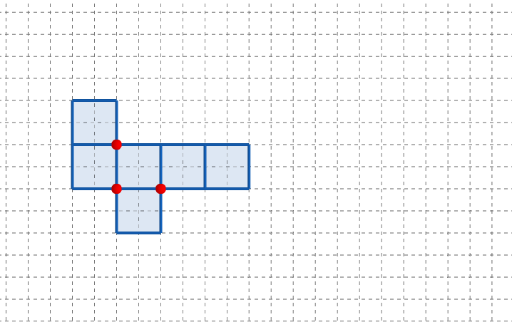
長方體有多少個摺紙圖樣?
This example demonstrates how to build a set of comparable geometric patterns in the plane by rotating key points and constructing polygonal shapes, so you can observe how the figure’s structure changes under a controlled transformation. The main math ideas include geometric construction (creating points and polygons), rotation transformation (distance/angle preservation), and geometry-driven characterization related to linear relations such as slope and difference. The associated theme also points to distribution/parameter thinking to connect structured geometry with statistical concepts. Construction highlights from the provided GeoGebra commands: Point is used to define multiple reference and parameterized points (A, B, C, q1, q2, q3, q4, q5, q6 and their primed counterparts), Polygon is used to connect points into the intended regions/boundaries using parameters like l, w, and h, and Rotate generates transformed copies of points or parts of the figure (q2', q4', q5', q6', etc.). Buttons (button1, button2) and time/parameter variables (t, t') support interactive control or animation of the pattern set. Suitable for middle/high school geometry on transformations, classroom interactive demonstrations, and exploratory modeling with GeoGebra.
GeoGebra Commands & Parameters
Point(Ray[(1, 0), (3, 0)]) → APoint(Ray[A + (1, 0), A + (2, 0)]) → CPoint(Ray[A + (0, 1), A + (0, 2)]) → BPolygon({(0, 0), A, B, (0, y(B))}) → q1Polygon({A, C, (x(C), y(B)), B}) → q2Polygon({B, B + (0, h), B + ((-l), h), B + ((-l), 0)}) → q4Polygon({C, C + (l, 0), C + (l, w), C + (0, w)}) → q5Polygon({C + (l, 0), C + (l + h, 0), C + (l + h, w), C + (l, w)}) → q6Rotate(q4, (90° * t), Line[(0, w), B]) → q4'Rotate(q2, (90° * t), Line[B, A]) → q2'Rotate(Rotate[q5, (90° * t), Line[C + (0, w), C]], (90° * t), Line[B, A]) → q5'Rotate(Rotate[Rotate[q6, (90° * t), Line[C + (l, w), C + (l, 0)]], (90° * t), Line[C + (0, w), C]], (90° * t), Line[B, A]) → q6'_{1}Polygon({A, C, C + (0, (-l)), A + (0, (-l))}) → q3Rotate(Rotate[q3, (90° * t), Line[C, A]], (90° * t), Line[B, A]) → q3'
AI Drawing Prompt Reference
Draw a set of geometric patterns in the plane created by rotating key points and constructing polygonal shapes. Start by creating several reference points, then connect them to form polygons. Rotate these polygons to observe how the structure of the figure changes under rotation. Use a slider to control the rotation angle and show the morphed patterns at different angles. The entire figure consists of multiple polygons that are interconnected through rotation and parameterization, forming a series of patterns with similar structures.
The prompt above was compiled from the original drawing commands and is for reference only.