
Rotational Axis of a Cube
Loading the math board and drawing, please wait…
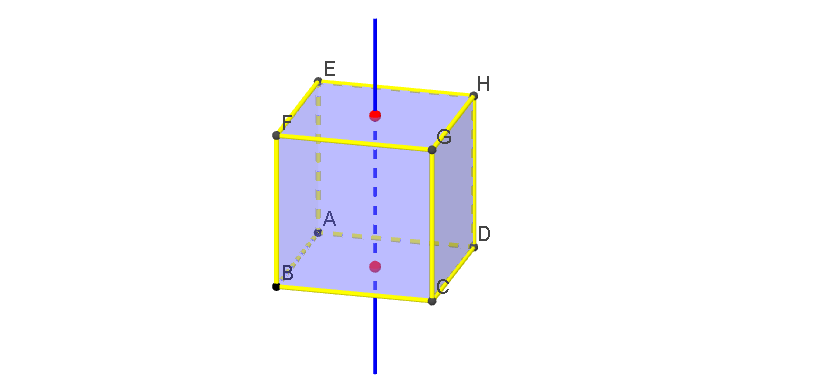
This example demonstrates the geometric construction and properties of the rotational axis of a cube. It involves core mathematical concepts such as solid geometry, vectors, and rotational transformations. Key GeoGebra commands used include Cube, PointIn, Line, Rotate, and Midpoint. Suitable for high school geometry education to understand spatial geometric transformations.
GeoGebra Commands & Parameters
Cube(A, B, xOyPlane) → a, C, faceBCGF, faceCDHG, faceEFGH, edgeAD, edgeAB, edgeBC, edgeCD, edgeAE, edgeDH, edgeEH, D, edgeEF, edgeBF, edgeFG, edgeCG, edgeGH, E, F, G, H, faceABCD, faceADHE, faceABFEPointIn(faceABCD) → JPointIn(faceEFGH) → ILine(I, J) → bRotate(a, (-α), b) → a'Rotate(faceABCD, (-α), b) → faceABCD'Rotate(faceABFE, (-α), b) → faceABFE'Rotate(faceADHE, (-α), b) → faceADHE'Rotate(faceBCGF, (-α), b) → faceBCGF'Rotate(faceCDHG, (-α), b) → faceCDHG'Rotate(faceEFGH, (-α), b) → faceEFGH'Midpoint(F, H) → KMidpoint(A, C) → LMidpoint(F, C) → MMidpoint(E, D) → NMidpoint(H, C) → OMidpoint(E, B) → PMidpoint(edgeFG) → QMidpoint(edgeGH) → RMidpoint(edgeEH) → SMidpoint(edgeEF) → TMidpoint(edgeBF) → UMidpoint(edgeCG) → VMidpoint(edgeBC) → WMidpoint(edgeDH) → ZMidpoint(edgeAE) → A_1Midpoint(edgeAD) → B_1Midpoint(edgeAB) → C_1Midpoint(edgeCD) → D_1
AI Drawing Prompt Reference
Draw a cube and identify its rotational axis. Select a point on the bottom face and another on the top face of the cube, then connect these points to form a line, which represents the axis of rotation. Rotate the cube around this axis to observe the transformed shape. Additionally, calculate and mark the midpoints of all edges to better visualize the rotational effect.
The prompt above was compiled from the original drawing commands and is for reference only.