
Rotation Transformation Demo by Steve Phelps
Loading the math board and drawing, please wait…
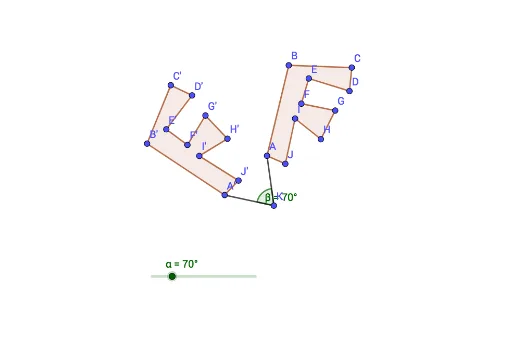
This example demonstrates the rotation transformation of polygons (like cuboids and trapezoids) in a 2D plane. It involves core math concepts such as rotation, angle, linear functions, difference and slope, and squares. The construction uses GeoGebra commands like Polygon, Rotate, Segment, and Angle. Suitable for high school students learning geometric transformations and coordinate geometry.
GeoGebra Commands & Parameters
Polygon(A, B, C, D, E, F, G, H, I, J) → poly1, a, j, b, c, d, e, f, g, h, iRotate(A, α, K) → A'Rotate(B, α, K) → B'Rotate(C, α, K) → C'Rotate(D, α, K) → D'Rotate(E, α, K) → E'Rotate(F, α, K) → F'Rotate(G, α, K) → G'Rotate(H, α, K) → H'Rotate(I, α, K) → I'Rotate(J, α, K) → J'Polygon(A', B', C', D', E', F', G', H', I', J') → poly1', a', j', b', c', d', e', f', g', h', i'Segment(A, K) → kSegment(K, A') → lAngle(A, K, A') → β
AI Drawing Prompt Reference
Draw a cuboid and a trapezoid in a 2D plane, then rotate both shapes around a point by a certain angle to demonstrate the rotation transformation. Include lines connecting the rotation center to the vertices before and after rotation, and label the rotation angle to illustrate concepts like rotation, angle, linear functions, difference, and slope.
The prompt above was compiled from the original drawing commands and is for reference only.