
Rotation of a Curve around the y-axis
Loading the math board and drawing, please wait…
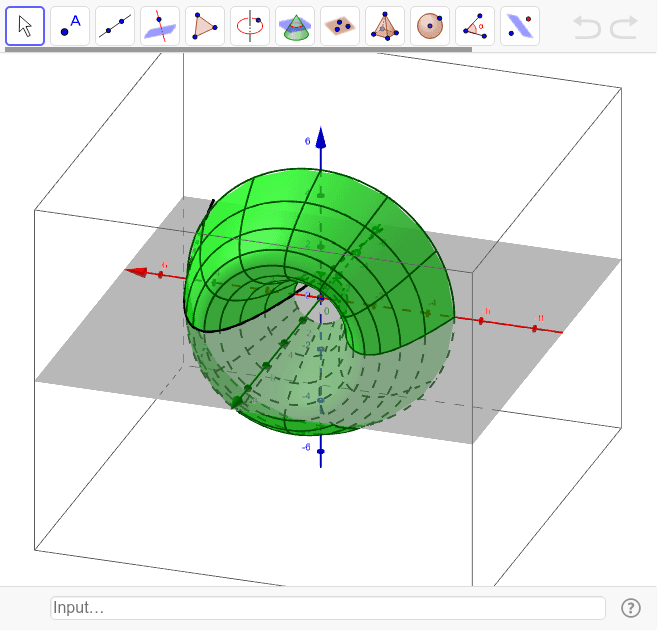
This example demonstrates the solid formed by rotating a curve around the y-axis. Key mathematical concepts include rotation geometry and solid geometry. Using the Surface and Sequence commands, a rotated surface can be constructed. Suitable for high school mathematics education and students learning solid geometry.
GeoGebra Commands & Parameters
Surface((t * cos(u)), f(t), (t * sin(u)), t, 1, 5, u, 0, 6.283185307179586) → aSequence(CurveCartesian[(t * cos(u)), f(t), (t * sin(u)), t, 1, 5], u, 0, 6.283185307179586, 0.5235987755982988) → list1Sequence(CurveCartesian[(t * cos(u)), f(t), (t * sin(u)), u, 0, 6.28319], t, 1, 5, 0.5) → list2
AI Drawing Prompt Reference
Draw the surface formed by rotating a curve around the y-axis to demonstrate key concepts in rotation geometry and solid geometry. Start by creating a rotating surface, then draw several curves as guides that rotate around the y-axis at different angles and connect to form a mesh-like structure, aiding in understanding the shape and structure of the solid of revolution.
The prompt above was compiled from the original drawing commands and is for reference only.