
Ellipse/Hyperbola Construction
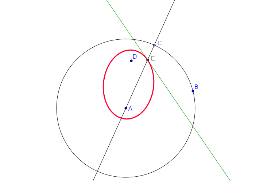
Loading the math board and drawing, please wait…
This example demonstrates how to construct ellipses and hyperbolas using GeoGebra. Key mathematical concepts include the definitions and properties of conic sections. Using commands like Point, Line, LineBisector, Intersect, and Locus, the construction process is made clear. Suitable for high school mathematics education, particularly in coordinate geometry and conic sections.
GeoGebra Commands & Parameters
Circle(A, B) → cPoint(c) → CLine(A, C) → aLineBisector(D, C) → bIntersect(a, b) → ELocus(E, C) → loc1
AI Drawing Prompt Reference
Draw an ellipse by first determining two foci A and B, then selecting a point C on the ellipse, drawing a line a through A and C, and constructing the perpendicular bisector b of C. The intersection point E of a and b is another point on the ellipse. Finally, use C as the parameter and E as the variable to draw the locus loc1 of the ellipse.
The prompt above was compiled from the original drawing commands and is for reference only.