
Rotation Animation 82
Loading the math board and drawing, please wait…
In collections
Congruence (CO) Cluster
Congruence (Vol 2)
CCSS High School: Geometry (Congruence) Volume 2
CCSS High School: Geometry (Congruence) Volume 2
CCSS High School: Geometry (Congruence) Volume 2
Geometry (Congruence) Volume 2
CCSS High School: Geometry (Congruence) Volume 2
CCSS High School: Geometry (Congruence) Volume 2
CCSS High School: Geometry (Congruence) Volume 2
CCSS High School: Geometry (Congruence) Volume 2
CCSS High School: Geometry (Congruence) Volume 2
CCSS High School: Geometry (Congruence) Volume 2
CCSS High School: Geometry (Congruence) Volume 2
Gail LeBlancCCSS High School: Geometry (Congruence) Volume 2
CCSS High School: Geometry (Congruence) Volume 2
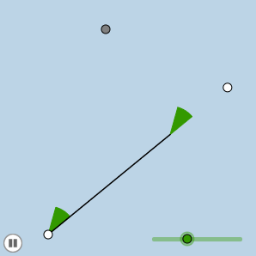
This example demonstrates a rotation animation involving angles and similar triangles. Using GeoGebra commands such as Rotate, Angle, Ray, and Point, it showcases the rotation of angles and transformations of similar triangles. Suitable for middle school and above students to learn about geometric transformations and similar triangles.
GeoGebra Commands & Parameters
Rotate(B, (-α), A) → B'Angle(B', A, B) → βRay(A, B') → fPoint(f) → CRotate(A, (-α), C) → A'Angle(A', C, A) → γRay(C, A') → gRay(A, B) → hIntersect(g, h) → DSegment(A, D) → iSegment(C, D) → jSegment(A, C) → kPolygon(A, C, D) → poly1, d, a, cMin(i, k) → eCircle(A, (0.2 * e)) → pIntersect(p, k, 1) → EIntersect(p, i, 1) → FCircleSector(A, E, F) → qDilate(A, If[0 < b ≤ 1, 1 - b, 0], C) → A'_1Segment(A, A'_1) → lVector(A, A'_1) → uTranslate(q, u) → q'Rotate(q', If[1 < b ≤ 2, ((b - 1) * (π - α)), π - α], C) → q''Dilate(A, If[2 < b ≤ 3, 3 - b, 0], D) → A'_2Dilate(C, If[2 < b ≤ 3, 3 - b, 0], D) → C'Segment(A, A'_2) → mSegment(C, C') → nRotate(A, If[3.5 < b ≤ 4.5, ((b - 3.5) * (π - (2 * α))), π - (2 * α)], D) → A'_3Rotate(A'_2, If[3.5 < b ≤ 4.5, ((b - 3.5) * (π - (2 * α))), π - (2 * α)], D) → GSegment(A'_3, G) → m'
AI Drawing Prompt Reference
This is a geometric figure demonstrating a rotation animation. The figure includes points A, B, and C connected through rotation and similar triangles. It also includes a ray f, point C', a circle p, and a circular arc q. The construction order starts with points A, B, and C, then determines points B' and C' through rotation and angle calculations. Next, the ray f and point C' are drawn, followed by intersecting rays to get point D. Then segments i, j, and k are drawn to form a triangle. The smallest segment i is used as a radius to draw circle p. Circle p intersects with segment k and i to get points E and F. Finally, circular arc q is drawn, and scaling and rotation operations yield points A'_1 and G. The overall figure illustrates rotation, similar triangles, and geometric transformations, suitable for learning about geometric transformations and similar triangles.
The prompt above was compiled from the original drawing commands and is for reference only.