
Rotation and Median Line Animation
Loading the math board and drawing, please wait…
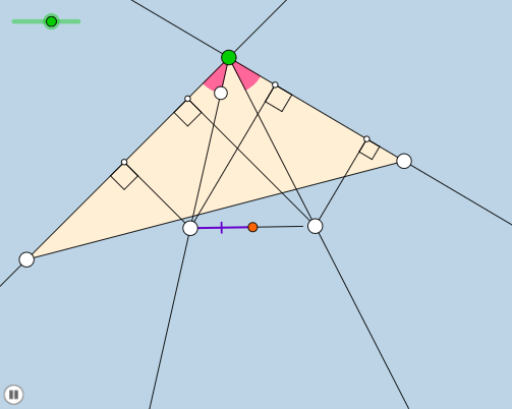
This example demonstrates the dynamic behavior of a median line within a triangle during rotation. It involves core concepts like rotation, median line, polygon construction, and geometric transformations. GeoGebra commands such as Rotate, Angle, Segment, Point, Intersect, Circle, Line, and Midpoint are used in the construction. Suitable for high school mathematics education to illustrate the properties of rotational transformations and median lines.
GeoGebra Commands & Parameters
Rotate(A, (a * π / 180), B) → A'Angle(A, B, A') → αSegment(B, A) → fRay(B, A') → gPoint(g) → CSegment(B, C) → hSegment(A, C) → iRotate(A, α / 2, B) → A'_1Angle(A, B, A'_1) → βRay(B, A'_1) → jIntersect(j, i) → DSegment(B, D) → kMin({f, h, k}) → bCircle(B, (0.25 * b)) → cIntersect(c, f, 1) → EIntersect(j, k) → FIntersect(c, h, 1) → GIntersect(c, j) → H,CircleArc(B, E, H) → dPoint(d) → IMirror(I, j) → I'Line(B, I') → lLine(B, I) → mRay(B, I') → nRay(B, I) → pPoint(p) → JLine(A, B) → qOrthogonalLine(J, q) → rIntersect(r, q) → KPoint(n) → LLine(B, C) → sOrthogonalLine(L, s) → tIntersect(s, t) → MOrthogonalLine(L, q) → eIntersect(q, e) → NOrthogonalLine(J, s) → f_1Intersect(s, f_1) → OMidpoint(J, L) → PCircle(P, K) → c_1Polygon(A, C, B) → poly1, b_1, a_1, c_2CircleSector(B, E, I) → d_1Angle(I, B, G) → γRotate(d_1, If[0 < o ≤ 1, (o * γ), γ], B) → e_1Angle(L, M, C) → δAngle(K, N, L) → εAngle(A, K, J) → ζAngle(J, O, C) → ηDilate(L, If[2 < o ≤ 3, 3 - o, 0], M) → L'Dilate(L, If[2 < o ≤ 3, 3 - o, 0], N) → L'_1Segment(L, L') → g_1Segment(L, L'_1) → h_1Dilate(J, If[3 < o ≤ 4, 4 - o, 0], O) → J'Dilate(J, If[3 < o ≤ 4, 4 - o, 0], K) → J'_1Segment(J, J') → i_1Segment(J, J'_1) → j_1Dilate(J, If[4 < o ≤ 5, 5 - o, 0], P) → J'_2Segment(J, J'_2) → k_1Dilate(P, If[5 < o ≤ 6, 6 - o, 0], L) → P'Segment(P, P') → l_1Rotate(J, If[6 < o ≤ 7, ((o - 6) * π), π], P) → J'_3Rotate(J'_2, If[6 < o ≤ 7, ((o - 6) * π), π], P) → QSegment(J'_3, Q) → m_1Dilate(P, If[7 < o ≤ 8, 8 - o, 0], N) → P'_1Segment(P, P'_1) → n_1Circle(P, P'_1) → p_1
AI Drawing Prompt Reference
Draw a triangle ABC with points A, B, and C as vertices. First, rotate line segment AB around point B, then construct the median AD. Next, use rotations and intersections to create a series of auxiliary line segments and arcs, ultimately forming a dynamically rotating triangle and showing the changes of median AD during the rotation.
The prompt above was compiled from the original drawing commands and is for reference only.