
Rotating Square by Ivan De Winne
Loading the math board and drawing, please wait…
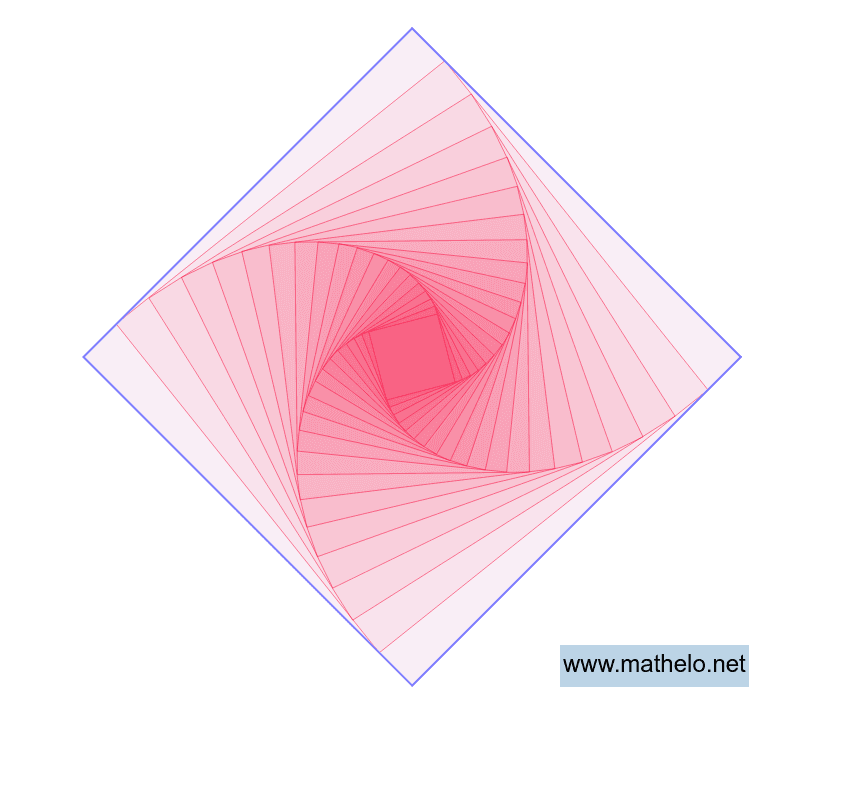
This example demonstrates the dynamic rotation of a square around its center. It involves core mathematical concepts such as rotation, square, logarithm, dilation, area, subtraction, and surface area. The construction utilizes GeoGebra commands/objects like Intersect, Circle, Polygon, and Sequence. It is suitable for high school students and teachers studying geometric transformations, function graphs, and dynamic geometry.
GeoGebra Commands & Parameters
Intersect(xAxis, yAxis) → ACircle(A, B) → cIntersect(c, yAxis, 2) → CIntersect(c, xAxis, 1) → DIntersect(c, yAxis, 1) → EPolygon(C, D, E, B) → veelhoek1, c_1, d, e, bSequence(Dilate[Polygon[Rotate[C, (i * a(k)), (0, 0)], Rotate[D, (i * a(k)), (0, 0)], Rotate[E, (i * a(k)), (0, 0)], Rotate[B, (i * a(k)), (0, 0)]], SF(k)^(i), (0, 0)], i, 0, n) → lijst1
AI Drawing Prompt Reference
Draw a rotating square around its center. The square is made of four points that maintain their relative positions during rotation. The rotation starts from the center and continues, showing the dynamic change of the square. Include a center point and the rotating square. The rotation can be continuous to illustrate the square's motion.
The prompt above was compiled from the original drawing commands and is for reference only.