
Rotating Shapes: Exploring Geometric Transformations of Polygons
Loading the math board and drawing, please wait…
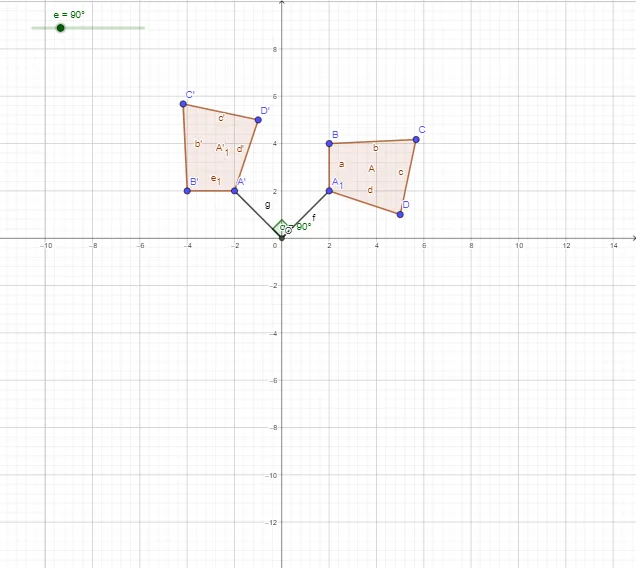
① This GeoGebra example dynamically demonstrates the rotation of polygons such as rectangles and trapezoids around a fixed point, visually showing the positional changes before and after rotation. ② Core mathematical concepts include rotation transformation, congruence, similarity transformation, vectors, and angle measurement on the unit circle, emphasizing that rotation preserves shape and size. ③ Construction details: The Polygon command creates the original polygon, Rotate performs the rotation, Segment and Angle commands help display the rotation radius and angle, involving objects like A, B, C, D, O, A', B', C', D', and angle α. ④ Suitable for middle and high school students learning geometric transformations, useful for classroom demonstrations or self-study to understand how rotation center, angle, and direction affect the position of figures.
GeoGebra Commands & Parameters
Polygon(A_1, B, C, D) → A, a, b, c, dRotate(A_1, e, O) → A'Rotate(B, e, O) → B'Rotate(C, e, O) → C'Rotate(D, e, O) → D'Polygon(A', B', C', D') → A'_1, e_1, b', c', d'Segment(O, A_1) → fSegment(O, A') → gAngle(A_1, O, A') → α