
Rotating Polygons for Art Figures
Loading the math board and drawing, please wait…
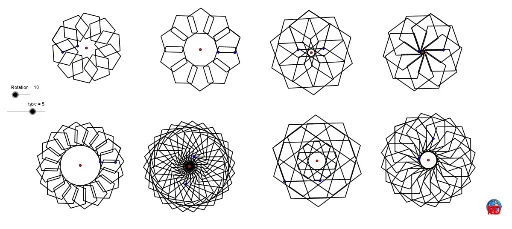
This example demonstrates creating art figures by rotating polygons. Key mathematical concepts include polygon rotation and geometric construction. It uses commands like Polygon, Sequence, and Rotation in GeoGebra. Suitable for middle school and above students or teachers for geometry construction and transformation lessons.
GeoGebra Commands & Parameters
Polygon(B, C, type) → poly1, a, j, D, E, F, G, H, I, J, K, b, c, d, e, f, g, h, iSequence(Rotate[poly1, i, A], i, 0, 6.283185307179586, (2 * π / Rotation)) → liste1Polygon(M, N, type) → poly2, k, b_2, O, P, Q, R, S, T, M_1, R_1, l, m, q, r, s, t, a_1, q_1Sequence(Rotate[poly2, i, L], i, 0, 6.28319, (2 * π / Rotation)) → liste2Polygon(V, W, type) → poly3, b_1, c_2, Z, A_1, B_1, C_1, D_1, N_1, O_1, S_1, c_1, d_1, e_1, f_1, g_1, h_1, r_1, s_1Sequence(Rotate[poly3, i, U], i, 0, 6.28319, (2 * π / Rotation)) → liste3Polygon(F_1, G_1, type) → poly4, i_1, d_2, H_1, I_1, J_1, K_1, L_1, P_1, Q_1, T_1, j_1, k_1, l_1, m_1, n_1, p_1, t_1, a_2Sequence(Rotate[poly4, i, E_1], i, 0, 6.28319, (2 * π / Rotation)) → liste4Polygon(V_1, W_1, type) → poly5, e_2, m_3, Z_1, A_2, B_2, C_2, R_2, U_2, V_2, C_3, f_2, g_2, h_2, i_2, j_2, d_3, g_3, h_3Sequence(Rotate[poly5, i, U_1], i, 0, 6.28319, π / Rotation) → liste5Polygon(E_2, F_2, type) → poly6, k_2, n_3, G_2, H_2, I_2, P_2, S_2, W_2, Z_2, D_3, l_2, m_2, n_2, p_2, b_3, e_3, i_3, j_3Sequence(Rotate[poly6, i, D_2], i, 0, 6.28319, (0.75 * π / Rotation)) → liste6Polygon(K_2, L_2, type) → poly7, q_2, p_3, M_2, N_2, O_2, Q_2, T_2, A_3, B_3, E_3, r_2, s_2, t_2, a_3, c_3, f_3, k_3, l_3Sequence(Rotate[poly7, i, J_2], i, 0, 6.28319, (2 * π / Rotation)) → liste7Polygon(G_3, H_3, type) → poly8, q_3, L_3, r_3, s_3, t_3, a_4, n, I_3, J_3, K_3Sequence(Rotate[poly8, i, F_3], i, 0, 6.28319, π / Rotation) → liste8