
Rotating Intersections
Loading the math board and drawing, please wait…
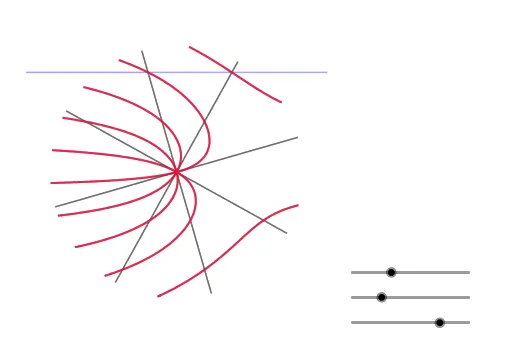
This example demonstrates the dynamic geometric phenomenon of observing the locus of intersection points of quadrilaterals through rotation and mirroring operations. Core math concepts include intersections, dilation, geometric transformations, and coordinate geometry. Construction highlights the use of GeoGebra commands like Rotate, Mirror, Polygon, Segment, Intersect, and Locus. Suitable for high school and above students to understand geometric transformations, locus construction, and optimization problems.
GeoGebra Commands & Parameters
Rotate(B, (2 * π / n)) → B'Mirror(B, A) → B'_1Mirror(B', A) → B''Polygon(B, B', n) → poly1, f, q, r, s, t, a, b, c, d, e, f_1, g, g_1, C, D, E, F, G, H, I, J, K, h, L, M, N, O, P, Q, R, S, T, i, j, k, l, m, pMirror(C, A) → C'Mirror(D, A) → D'Mirror(E, A) → E'Mirror(F, A) → F'Mirror(G, A) → G'Mirror(H, A) → H'Mirror(I, A) → I'Mirror(J, A) → J'Segment(B, B'_1) → h_1Segment(B', B'') → i_1Segment(C, C') → j_1Segment(D, D') → k_1Segment(E, E') → l_1Segment(F, F') → m_1Segment(G, G') → n_1Segment(H, H') → p_1Segment(I, I') → q_1Segment(J, J') → r_1Rotate(B, aa + ss) → B'_2Rotate(B'_1, aa + ss) → USegment(B'_2, U) → s_1Rotate(B', aa + ss) → B''_1Rotate(B'', aa + ss) → B'''Segment(B''_1, B''') → t_1Rotate(D, aa + ss) → D'_1Rotate(D', aa + ss) → D''Segment(D'_1, D'') → a_1Rotate(E, aa + ss) → E'_1Rotate(E', aa + ss) → E''Segment(E'_1, E'') → b_1Rotate(C, aa + ss) → C'_1Rotate(C', aa + ss) → C''Segment(C'_1, C'') → c_1Rotate(F, aa + ss) → F'_1Rotate(F', aa + ss) → F''Segment(F'_1, F'') → d_1Rotate(G, aa + ss) → G'_1Rotate(G', aa + ss) → G''Segment(G'_1, G'') → e_1Rotate(H, aa + ss) → H'_1Rotate(H', aa + ss) → H''Segment(H'_1, H'') → f_2Rotate(I, aa + ss) → I'_1Rotate(I', aa + ss) → I''Segment(I'_1, I'') → g_2Rotate(J, aa + ss) → J'_1Rotate(J', aa + ss) → J''Segment(J'_1, J'') → h_2Intersect(p_2, h_2) → VIntersect(p_2, g_2) → WIntersect(p_2, f_2) → ZIntersect(p_2, e_1) → A_1Intersect(p_2, d_1) → B_1Intersect(p_2, b_1) → C_1Intersect(p_2, a_1) → D_1Intersect(p_2, c_1) → E_1Intersect(p_2, t_1) → F_1Intersect(p_2, s_1) → G_1Locus(A_1, aa) → loc1Locus(B_1, aa) → loc2Locus(C_1, aa) → loc3Locus(D_1, aa) → loc4Locus(E_1, aa) → loc5Locus(F_1, aa) → loc6Locus(G_1, aa) → loc7Locus(V, aa) → loc8Locus(W, aa) → loc9Locus(Z, aa) → loc10Polygon(H_1, I_1, 4) → poly2, i_2, j_2, k_2, l_2, J_1, K_1
AI Drawing Prompt Reference
Draw a regular polygon with vertices rotated around a central point. First, construct the polygon, then mirror each vertex across the center point to create symmetric counterparts, and connect each original vertex to its mirrored one with a segment. Next, rotate the entire polygon and its mirrored vertices by a dynamic angle around the center, generating new rotated vertices, and connect corresponding rotated vertices to form another set of segments. Finally, observe the locus of intersection points of these segments, illustrating the dynamic geometric pattern formed by rotation and mirroring operations.
The prompt above was compiled from the original drawing commands and is for reference only.