
Two Fixed Ends Linkage
Loading the math board and drawing, please wait…
In collections
Linkages
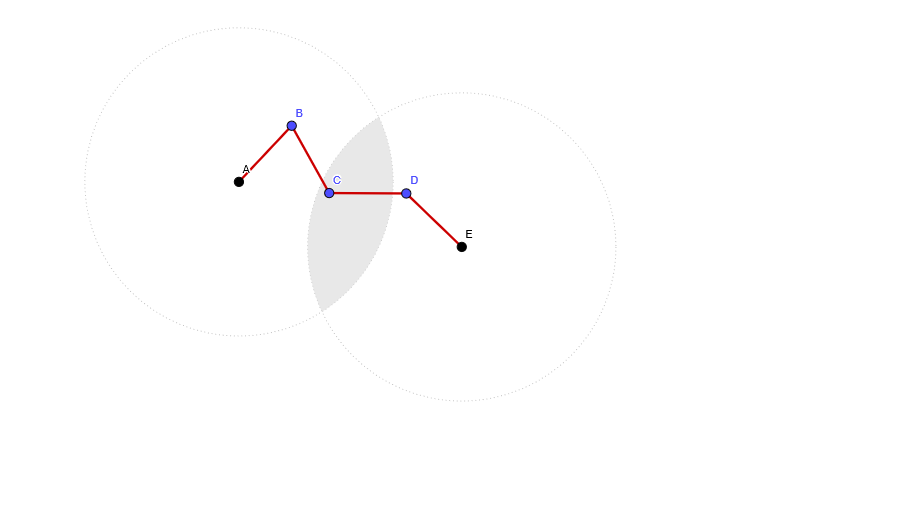
This example demonstrates the construction and motion of a linkage mechanism with two fixed endpoints. It involves core mathematical concepts such as coordinate geometry, geometric constructions, geometric transformations, and locus. The construction uses GeoGebra commands like Circle, ClosestPoint, and Intersect, along with objects A, E, c, d, reg, B, C, D, barras, F, G, H, bor, I. It is suitable for high school students studying geometric constructions, locus, and linkages.
GeoGebra Commands & Parameters
Circle(A, 2) → cCircle(E, 2) → dClosestPoint({Intersect[Circle[A, 1], Circle[C, 1]]}, B) → FIntersect(c, d) → G, H, ,ClosestPoint(bor, C) → I
AI Drawing Prompt Reference
Draw a linkage mechanism with two fixed endpoints. First, draw two circles c and d with centers at points A and E, both with radius 2. Then, find the intersection points G and H of circles c and d. Next, determine the closest point F on circle c to point B. Finally, find point I on line segment bor, which is closest to point C.
The prompt above was compiled from the original drawing commands and is for reference only.