
Rotating a Polygon 45° Counterclockwise About the Origin
Loading the math board and drawing, please wait…
In collections
CCSS IP Math I Unit 5 Lesson 5
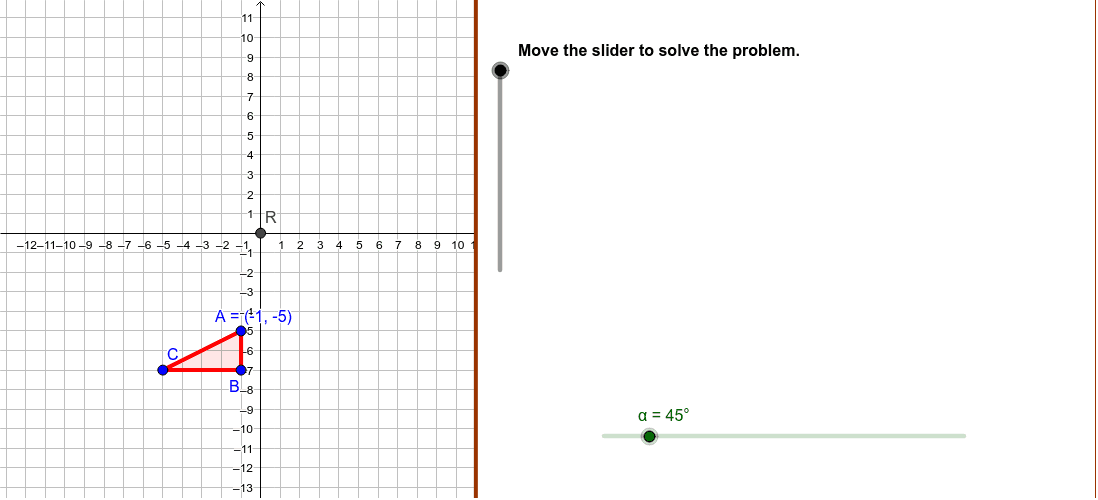
This GeoGebra example demonstrates a plane geometric transformation in which a given polygon is rotated 45 degrees counterclockwise about the origin of the coordinate system. The core mathematical concepts include rigid transformations, rotation in Euclidean geometry, angle measurement, preservation of distances and angles, and the correspondence between pre-image vertices A, B, C and image vertices A′, B′, C′. The construction uses GeoGebra commands such as Polygon to build the original polygon poly1 and its rotated image poly2, Rotate to apply the 45° counterclockwise rotation about point R, Angle to mark the rotation angle α, Segment and Ray to draw segments and rays from the center to the vertices and their images, Intersect for auxiliary intersection points, and CircumcircleArc to visualize the circular arc traced during rotation. Slider objects support dynamic parameter control and step-by-step animation. This resource is suitable for middle school geometry lessons on transformations, high school coordinate geometry review, and interactive classroom demonstrations or student-centered inquiry activities.
GeoGebra Commands & Parameters
Polygon((11, y(Corner[1])), Corner[2], Corner[3], (11, y(Corner[4]))) → Mask, mask4, mask3, mask2, mask1Intersect(xAxis, yAxis) → RRotate(A, α, R) → A'Rotate(B, α, R) → B'Rotate(C, α, R) → C'Segment(A, R) → RASegment(B, R) → RBSegment(C, R) → RCRay(R, A') → rayRA'Ray(R, B') → rayRB'Ray(R, C') → rayRC'Polygon(A, B, C) → poly1, poly1AB, poly1BC, poly1ACPolygon(A', B', C') → poly2, poly2AB, poly2BC, poly2ACRotate(A, α / 2, R) → A'_1CircumcircleArc(A, A'_1, A') → arcAA'Angle(A, R, A') → αAAngle(B, R, B') → αBAngle(C, R, C') → αCRotate(B, α / 2, R) → B'_1Rotate(C, α / 2, R) → C'_1CircumcircleArc(B, B'_1, B') → arcBB'CircumcircleArc(C, C'_1, C') → arcCC'
AI Drawing Prompt Reference
Draw a polygon rotated 45 degrees counterclockwise about the origin. Include the original polygon, the rotated polygon, the rotation center, pre-image vertices A, B, C, image vertices A', B', C', line segments RA, RB, RC from the center to the vertices, rays rayRA', rayRB', rayRC' from the center to the images, and circular arcs arcAA', arcBB', arcCC'. First draw the original polygon and the center, then rotate the vertices, and finally connect the center to each point and draw the rays and arcs.
The prompt above was compiled from the original drawing commands and is for reference only.