
Rotate Figure by Any Angle: Dynamic Angle and Measurements
Loading the math board and drawing, please wait…
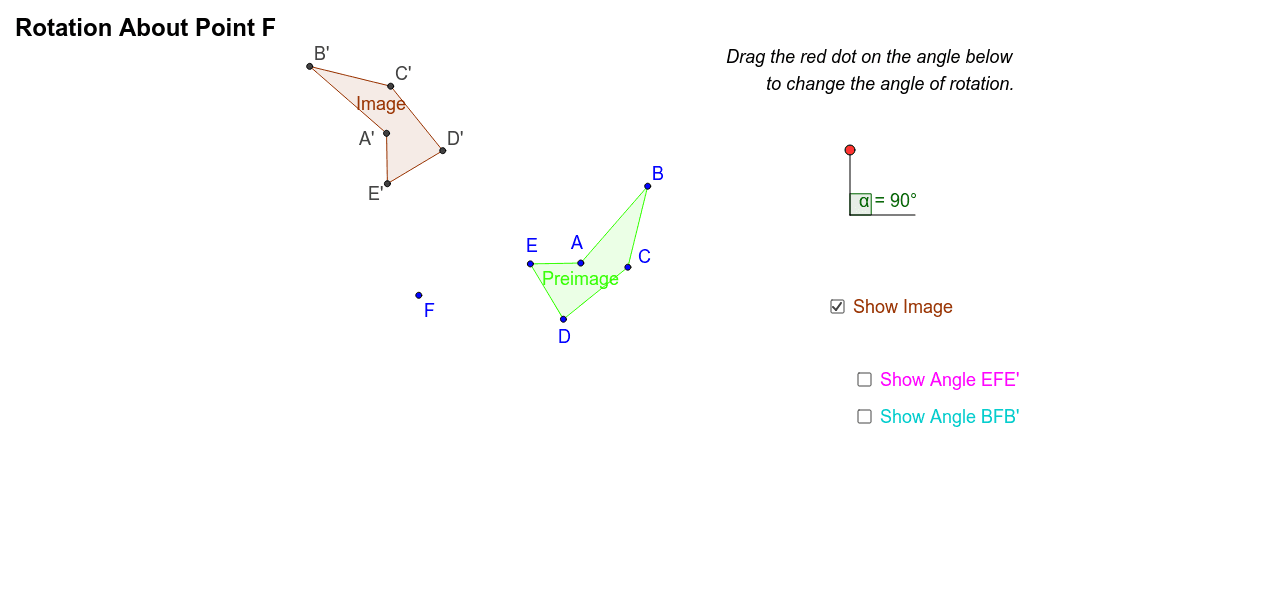
This example demonstrates how to rotate an arbitrary polygon (here a pentagon) around a point by any angle by dragging a ray of an angle, with dynamic display of the preimage, image, and measurements. The core mathematical concept is geometric transformation, specifically rotation, involving dynamic angle changes, congruence, and corresponding properties of figures before and after rotation. Construction highlights: using GeoGebra commands such as Polygon, Circle, Point, Segment, Angle, and Rotate to build the original figure (Preimage) and the rotated figure (Image), with angle α controlling the rotation, and text objects showing angle and side length measurements. Suitable for middle or high school geometry classes, this interactive tool helps students intuitively understand the definition and properties of rotation, the relationship between angle and figure position, and can be used to explore rotational symmetry and congruent figures.
GeoGebra Commands & Parameters
Polygon(A, B, C, D, E) → Preimage, a, b, c, d, eCircle(G, I) → fPoint(f) → JSegment(I, G) → gSegment(G, J) → hAngle(I, G, J) → αRotate(A, α, F) → A'Rotate(B, α, F) → B'Rotate(C, α, F) → C'Rotate(D, α, F) → D'Rotate(E, α, F) → E'Polygon(A', B', C', D', E') → Image, a', b', c', d', e'Segment(E', F) → jSegment(F, E) → kSegment(B', F) → lSegment(B, F) → mAngle(B, F, B') → βAngle(E, F, E') → γ
AI Drawing Prompt Reference
Draw an arbitrary pentagon as the original figure. Place a rotation center point and a circle around it. Pick a point on the circle and connect it to the center to form a ray; dragging this point changes the rotation angle dynamically. Rotate each vertex of the pentagon around the center by the current angle to obtain the rotated pentagon, and distinguish the original and image figures with different colors or line styles. Display the angle value, and connect the center to corresponding vertices of both figures, labeling the angles between them to show congruence and rotation properties.
The prompt above was compiled from the original drawing commands and is for reference only.