
Rotate around any line
Loading the math board and drawing, please wait…
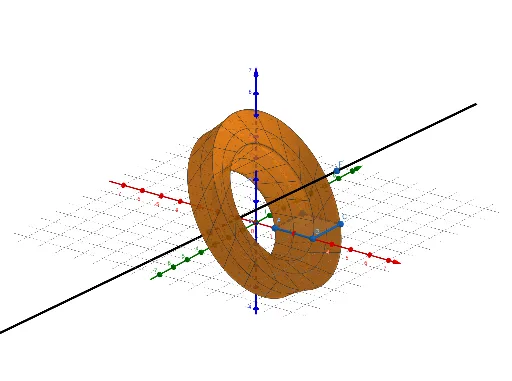
This example demonstrates how to rotate a polygon around an arbitrary line in 3D space, generating a rotational surface or solid. Core mathematical concepts include 3D rotation transformations, line equations, surface generation, and parametric representation of geometric objects. Construction highlights: using GeoGebra commands Polygon (objects A, B, C, D) to define the base shape, Line (objects a, b, c, d, E, F, f) to set the rotation axis, and Surface (object q1) to create the resulting surface, with slider α controlling the rotation angle for dynamic exploration. Suitable for high school or university courses in solid geometry and spatial analytic geometry, helping students visualize how rotating a plane figure around a line produces a 3D object and understand spatial transformations intuitively.
GeoGebra Commands & Parameters
Polygon(A, B, C, D) → q1, a, b, c, dLine(E, F) → fSurface(q1, α, f) → e
AI Drawing Prompt Reference
In 3D space, first draw a planar polygon defined by four vertices as the base shape. Then specify a straight line that does not lie in the same plane as the polygon, serving as the rotation axis. Rotate the polygon around this line to generate a rotational surface or solid. Include a slider to dynamically control the rotation angle, allowing interactive exploration of how a plane figure revolving around an arbitrary line produces a 3D object. The scene consists of the polygon, the rotation axis, the generated surface, and the angle slider.
The prompt above was compiled from the original drawing commands and is for reference only.