
Rocket Trajectory from Satellite Launch
Loading the math board and drawing, please wait…
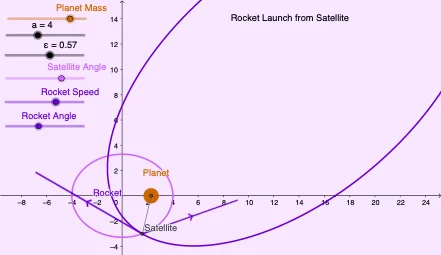
This example demonstrates the trajectory of a rocket launched from a satellite. Key mathematical concepts include ellipses, hyperbolas, tangent lines, and parabolas. Using GeoGebra commands such as Segment and CurveCartesian, the trajectory of the rocket can be constructed. Suitable for high school and above students studying coordinate geometry and calculus.
GeoGebra Commands & Parameters
Segment(O, P) → r_1CurveCartesian((a * ε) + (c^(2) * cos(t) / (μ + ((c * v_S) * sin(ψ_S - t)) - (μ * cos(θ_P - t)))), (c^(2) * sin(t) / (μ + ((c * v_S) * sin(ψ_S - t)) - (μ * cos(θ_P - t)))), t, 0, 6.283185307179586) → RSegment(P, P + (v_S * (cos(ψ_S), sin(ψ_S)))) → SVvektorSegment(P, P + (v * Q)) → PVvektorCurveCartesian((a * ε) + (M^(1 / 3) * cos(t) / 2), (M^(1 / 3) * sin(t) / 2), t, 0, 6.28319) → Planet
AI Drawing Prompt Reference
Draw a diagram showing a rocket trajectory launched from a satellite. Start with a line segment from the satellite point to a reference point. Then draw a closed curve representing the rocket's path, defined by parametric equations involving elliptical, hyperbolic, and parabolic elements. From the reference point, draw two short line segments in different directions to indicate the satellite's velocity and the rocket's velocity. Finally, draw a large circle centered at the satellite to represent the planet. The overall figure illustrates the rocket's motion along a complex curve, including tangent lines, velocity vectors, and the planetary boundary.
The prompt above was compiled from the original drawing commands and is for reference only.