
Bezier Curve Linear Interpolation Construction
Loading the math board and drawing, please wait…
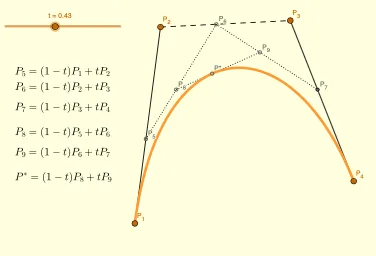
This example demonstrates the construction of Bezier curves through repeated linear interpolation. It involves core mathematical concepts like linear interpolation, Bezier curves, and parametric equations. The construction uses GeoGebra commands such as Segment and Locus, along with objects like P_1, P_2, t, P_5, P_3, P_6, c, P_8, d, e, texto1, texto2, P_4, b, P_7, a, P_9, f, BZ, lugar1, text1. It is suitable for high school and above students to understand the generation principles and geometric construction methods of Bezier curves.
GeoGebra Commands & Parameters
Segment(P_5, P_6) → cSegment(P_1, P_2) → dSegment(P_2, P_3) → eSegment(P_3, P_4) → bSegment(P_6, P_7) → aSegment(P_8, P_9) → fLocus(BZ, t) → lugar1
AI Drawing Prompt Reference
Draw a Bezier curve constructed through repeated linear interpolation. Start by drawing two line segments, then sequentially draw line segments connecting the endpoints of these segments, and add two slanted line segments. Finally, based on parameter t, draw a locus to show the formation of the Bezier curve.
The prompt above was compiled from the original drawing commands and is for reference only.