
Rock Paper Scissors Extended: Fire Water Air Sponge Random Battle Simulation
Loading the math board and drawing, please wait…
In collections
Rock Paper Scissors type games
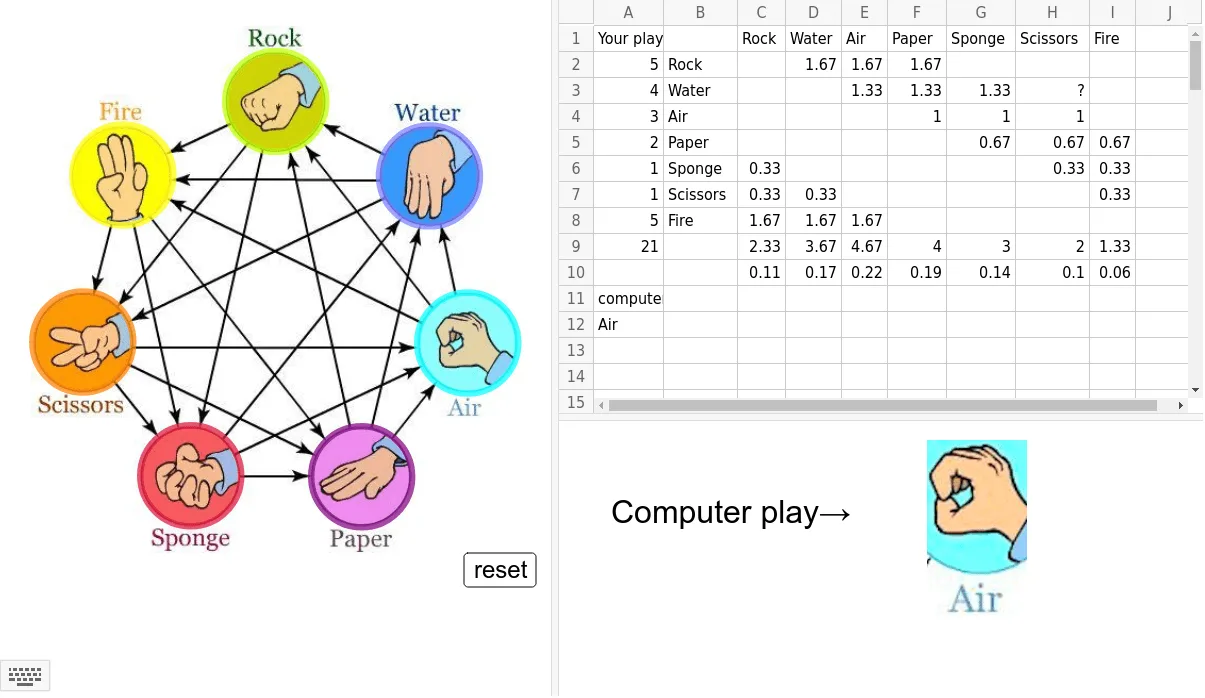
① This example demonstrates an extended version of the classic Rock-Paper-Scissors game (adding Fire, Water, Air, and Sponge) as a random battle simulation in GeoGebra, showing each round's outcome and cumulative statistics. ② Core mathematical concepts include stochastic processes (each move is an independent random event), probability and statistics (frequencies and win rates of each option), and conditional logic (the non-transitive win relationships). ③ Construction highlights: uses GeoGebra commands such as Circle to draw the battle area, CountIf and Sum to tally occurrences and wins, IndexOf and Element to implement win/loss logic, with a play button and sliders to control simulation rounds; objects include points A, B, C, D etc. representing options and text labels. ④ Suitable for middle school mathematics or computer science classes to teach random simulation, probability estimation, and logical reasoning, also as a fun activity to spark interest in probability and statistics.
GeoGebra Commands & Parameters
Circle(C, D) → roCircle(E, Radius[ro]) → waCircle(F, Radius[ro]) → aiCircle(G, Radius[ro]) → paCircle(H, Radius[ro]) → spCircle(I, Radius[ro]) → scCircle(J, Radius[ro]) → fiCountIf(x ≟ "Rock", play) → A2CountIf(x ≟ "Water", play) → A3CountIf(x ≟ "Air", play) → A4CountIf(x ≟ "Paper", play) → A5CountIf(x ≟ "Sponge", play) → A6CountIf(x ≟ "Scissors", play) → A7CountIf(x ≟ "Fire", play) → A8Sum(A2:A8) → A9IndexOf(Max[compprob], compprob) → aElement(compplay, a) → comp
AI Drawing Prompt Reference
Draw an extended rock-paper-scissors random battle simulation scene. In the center, place a circular battle arena. Around it, arrange seven equally spaced circular icons representing rock, water, air, paper, sponge, scissors, and fire, each with distinct colors and symbols. Below the arena, add a slider to control the number of rounds and a play button. During simulation, randomly select two options to battle, showing the round outcome above, and display frequency and win rate statistics for each option using bar charts or numbers. Keep the layout clear for educational demonstration, emphasizing randomness and probability.
The prompt above was compiled from the original drawing commands and is for reference only.