
Right Triangle Trigonometry: Introduction to Constant Side Ratios
Loading the math board and drawing, please wait…
In collections
Similarity & Right Triangle Trigonometry
Similarity, Right Triangles, and Trigonometry (SRT) Cluster
GA Chapter 8: Right Triangles and Trigonometry
Unit 9: Right Triangles and Trigonometry
Unit 9: Right Triangles and Trigonometry
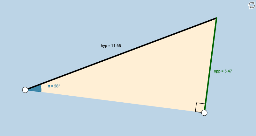
This interactive GeoGebra applet introduces students to the fundamentals of right triangle trigonometry by demonstrating that right triangles similar by the Angle-Angle (AA) theorem have constant ratios of any two sides. The core mathematical concepts include triangle similarity, the AA similarity criterion, and the definition of trigonometric ratios (sine, cosine, tangent) as constant values depending solely on the acute angles. The construction utilizes commands such as Ray, OrthogonalLine, Point, Rotate, Angle, Intersect, Segment, and Polygon to dynamically generate triangles and label sides (hypotenuse, adjacent, opposite). It is designed for high school mathematics classrooms, serving as an intuitive visual aid for students to discover the constant nature of trigonometric ratios before formal definitions are introduced.
GeoGebra Commands & Parameters
Ray(A, C) → a_1OrthogonalLine(C, a_1) → bPoint(b) → C_1Ray(C, C_1) → cRotate(C, β, A) → B'Angle(C, A, B') → αRay(A, B') → dIntersect(c, d) → DSegment(A, D) → hypSegment(A, C) → adjSegment(C, D) → oppAngle(D, C, A) → γPolygon(A, C, D) → poly1, d_1, a, b_1
AI Drawing Prompt Reference
Draw a right triangle showing the ratios of the legs, hypotenuse, and another leg. The triangle has a right angle at one vertex. Label the legs, hypotenuse, and another leg, and explain that these ratios remain constant in similar triangles.
The prompt above was compiled from the original drawing commands and is for reference only.