
Right Triangle Trig Introduction and Exploration
Loading the math board and drawing, please wait…
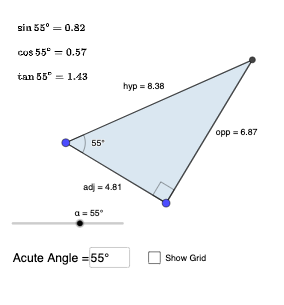
This example demonstrates the trigonometric relationships in a right triangle. Key mathematical concepts include sine, cosine, and tangent. Through steps involving rotation, angle measurement, and line segment construction, students can intuitively understand the definitions and applications of these functions in a right triangle. GeoGebra commands used include Segment, OrthogonalLine, Rotate, Angle, Ray, Intersect, and Polygon. Suitable for middle school and above students to learn trigonometry and geometric construction.
GeoGebra Commands & Parameters
Segment(A, B) → adjOrthogonalLine(B, adj) → gTextfield(α) → InputBox1Rotate(B, α, A) → B'Angle(B, A, B') → βRay(A, B') → hIntersect(g, h) → CPolygon(A, B, C) → t1, c, a, bSegment(B, C) → oppSegment(C, A) → hypAngle(C, B, A) → γ
AI Drawing Prompt Reference
Draw a right triangle with one leg horizontal. Construct a vertical line through the right endpoint of this horizontal leg. At the left endpoint, rotate the right endpoint by an adjustable angle to create a ray that intersects the vertical line, forming the third vertex. Connect the three vertices to form the triangle, and label the right angle, acute angles, and all three sides. Include an input box to change the rotation angle, dynamically altering the triangle to illustrate sine, cosine, and tangent relationships.
The prompt above was compiled from the original drawing commands and is for reference only.