
Right Triangle Generator
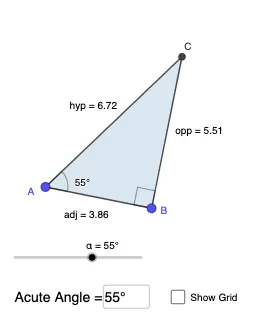
Loading the math board and drawing, please wait…
In collections
Similarity & Right Triangle Trigonometry
This is a right triangle generator that allows you to create a right triangle by plotting two points and entering an acute angle measure. The core mathematical concepts involved are trigonometric functions, specifically sine and cosine. The construction uses GeoGebra commands such as Segment, OrthogonalLine, Textfield, Rotate, Angle, Ray, Intersect, and Polygon. Suitable for middle school and above students to learn about the properties of right triangles and trigonometric functions.
GeoGebra Commands & Parameters
Segment(A, B) → adjOrthogonalLine(B, adj) → gTextfield(α) → InputBox1Rotate(B, α, A) → B'Angle(B, A, B') → βRay(A, B') → hIntersect(g, h) → CPolygon(A, B, C) → t1, c, a, bSegment(B, C) → oppSegment(C, A) → hypAngle(C, B, A) → γ
AI Drawing Prompt Reference
Draw a right triangle by first setting two points A and B on the coordinate plane, then inputting an acute angle α to rotate point B to generate point B', constructing the angle between B' and A as β, using the ray from B' through A and the perpendicular line from B to intersect at point C, and finally connecting points A, B, and C to form the right triangle, where AB is the adjacent side, BC is the opposite side, and AC is the hypotenuse.
The prompt above was compiled from the original drawing commands and is for reference only.