
Rhombus with Diagonals Construction
Loading the math board and drawing, please wait…
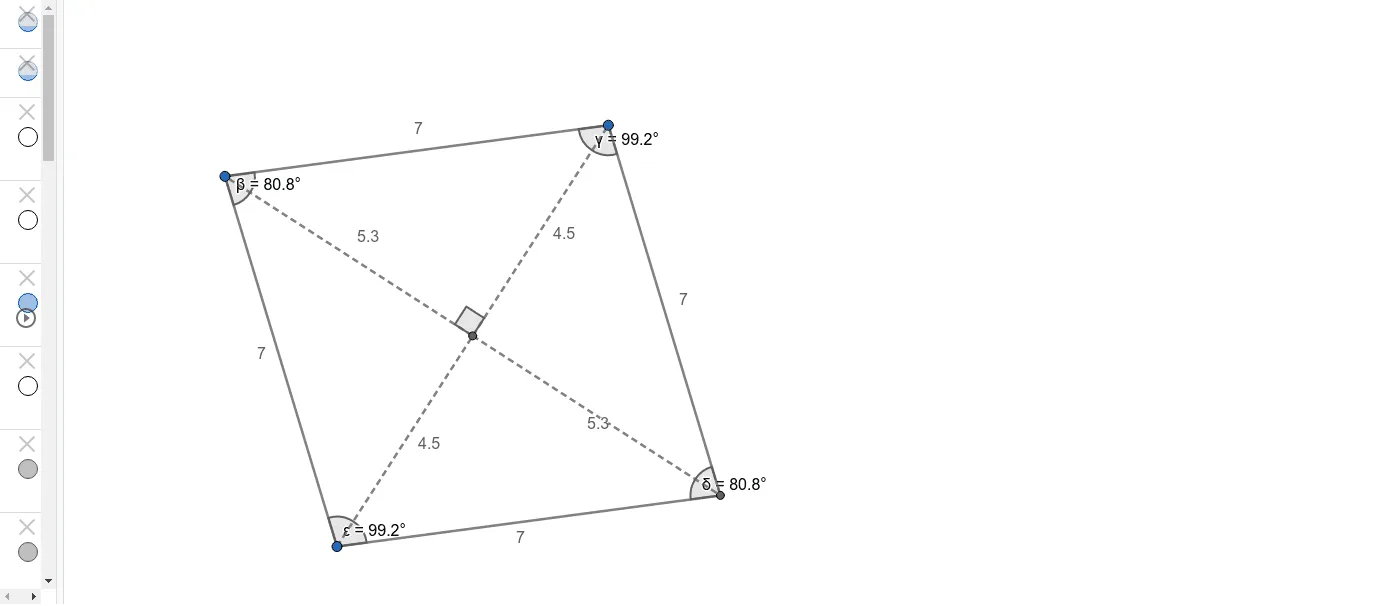
① This GeoGebra example demonstrates how to construct a rhombus and visualize its diagonal properties, specifically that diagonals are perpendicular bisectors of each other and bisect the vertex angles. ② Core mathematical concepts include the definition of a rhombus (all sides equal), properties of diagonals, perpendicular bisectors, angle bisectors, and geometric measurements (distances and angles). ③ Construction steps: use the Segment tool to create side AB, apply LineBisector to construct perpendicular bisectors, use Circle and Intersect to determine vertices C and D, then employ Angle and Distance tools to measure diagonal angles and side lengths. Key objects include points A, B, C, D, E, segments f and g, circle c, angles α, β, γ, δ, ε, and distance variables. ④ Suitable for middle school geometry or high school coordinate geometry, ideal for verifying rhombus diagonal properties interactively and as a starting point for dynamic geometric exploration.
GeoGebra Commands & Parameters
Segment(A, B) → fLineBisector(f) → gPoint(g) → CCircle(A, C) → cIntersect(c, g, 2) → DSegment(C, A) → hSegment(A, D) → iSegment(D, B) → jSegment(B, C) → kSegment(C, D) → lSegment(B, A) → mIntersect(l, m) → ESegment(B, A) → nAngle(B, E, C) → αDistance(C, E) → distanceCEDistance(E, D) → distanceEDDistance(E, B) → distanceEBDistance(E, A) → distanceEASegment(A, E) → pSegment(E, D) → qSegment(E, B) → rSegment(E, C) → sAngle(A, C, B) → βAngle(C, B, D) → γAngle(B, D, A) → δAngle(D, A, C) → ε
AI Drawing Prompt Reference
Draw a rhombus and visualize its diagonal properties. The rhombus has all sides equal, and its diagonals are perpendicular bisectors of each other and bisect the vertex angles. Construction steps: first draw segment AB, then construct the perpendicular bisector of AB to find points C and D. Measure diagonal angles and side lengths to verify these properties. Key objects include points A, B, C, D, point E (intersection of diagonals), segments f and g, circle c, angles α, β, γ, δ, ε.
The prompt above was compiled from the original drawing commands and is for reference only.