
General Quadrilateral with Diagonals
Loading the math board and drawing, please wait…
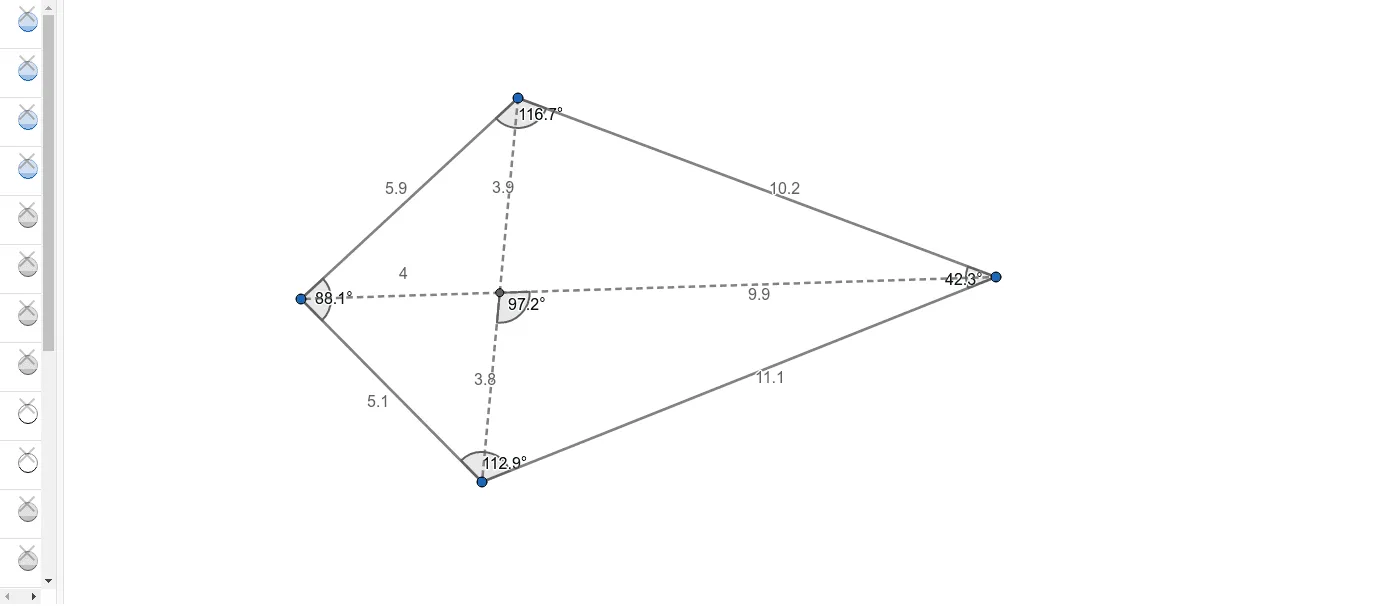
This GeoGebra example demonstrates the geometric construction of a general quadrilateral and its two diagonals. By defining four points A, B, C, D in the plane and connecting them, we explore the fundamental properties of quadrilaterals. Key mathematical concepts include quadrilateral classification, diagonal intersection, and angle measurement. Construction details: Use the Segment command to draw the four sides AB, BC, CD, DA; use the Intersect command to find the intersection point E of the two diagonals; use the Angle command to measure the interior angles α, β, γ, δ at each vertex and the angle ε between the diagonals. Suitable for middle school mathematics students learning about polygons and geometric construction, as well as a foundation for high school coordinate geometry.
GeoGebra Commands & Parameters
Segment(A, B) → fSegment(B, C) → gSegment(C, D) → hSegment(D, A) → iSegment(A, C) → jSegment(D, B) → kIntersect(j, k) → ESegment(A, E) → lSegment(E, D) → mSegment(E, C) → nSegment(E, B) → pAngle(D, A, B) → αAngle(A, B, C) → βAngle(B, C, D) → γAngle(C, D, A) → δAngle(C, E, B) → ε
AI Drawing Prompt Reference
Draw a quadrilateral ABCD by connecting points A, B, C, and D with four sides. Then draw the diagonals AC and BD and find their intersection point E. Measure the four interior angles α, β, γ, δ at each vertex and the angle ε between the diagonals AC and BD.
The prompt above was compiled from the original drawing commands and is for reference only.