
Rhombus with Diagonals by Allie Fryer
Loading the math board and drawing, please wait…
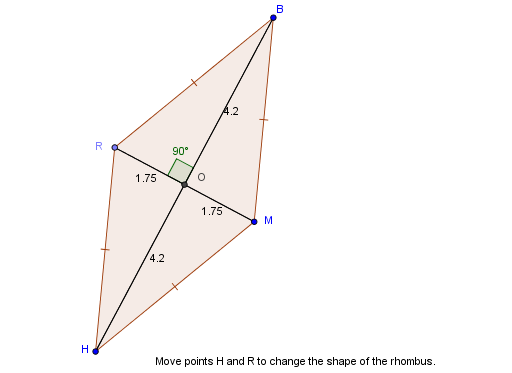
This example demonstrates how to construct a rhombus and its diagonals using GeoGebra, highlighting properties like perpendicular bisectors. Core concepts include polygons, diagonal intersections, angles, and coordinate geometry. Construction involves commands like Circle, Point, Segment, Mirror, Polygon, Intersect, and Angle. Suitable for high school mathematics education to explore geometric properties and function graphing.
GeoGebra Commands & Parameters
Circle(H, M) → cPoint(c) → RSegment(R, M) → RMMirror(H, RM) → BPolygon(B, R, H, M) → poly1, a', c_1, a_1, bSegment(H, B) → HBIntersect(HB, RM) → OAngle(B, O, R) → αSegment(R, O) → aSegment(B, O) → dSegment(O, M) → eSegment(O, H) → f
AI Drawing Prompt Reference
Draw a rhombus and its diagonals. Start by creating two circles with diameters equal to the lengths of the diagonals, intersecting at the vertices of the rhombus. Connect the vertices to form the rhombus, and identify the intersection point of the diagonals. The diagonals bisect each other at right angles, dividing the rhombus into four congruent right triangles. Label the diagonals and their intersection point, and highlight the right angles formed by the diagonals and the sides of the rhombus to emphasize its geometric properties.
The prompt above was compiled from the original drawing commands and is for reference only.