
Rhombus to Rectangle
Loading the math board and drawing, please wait…
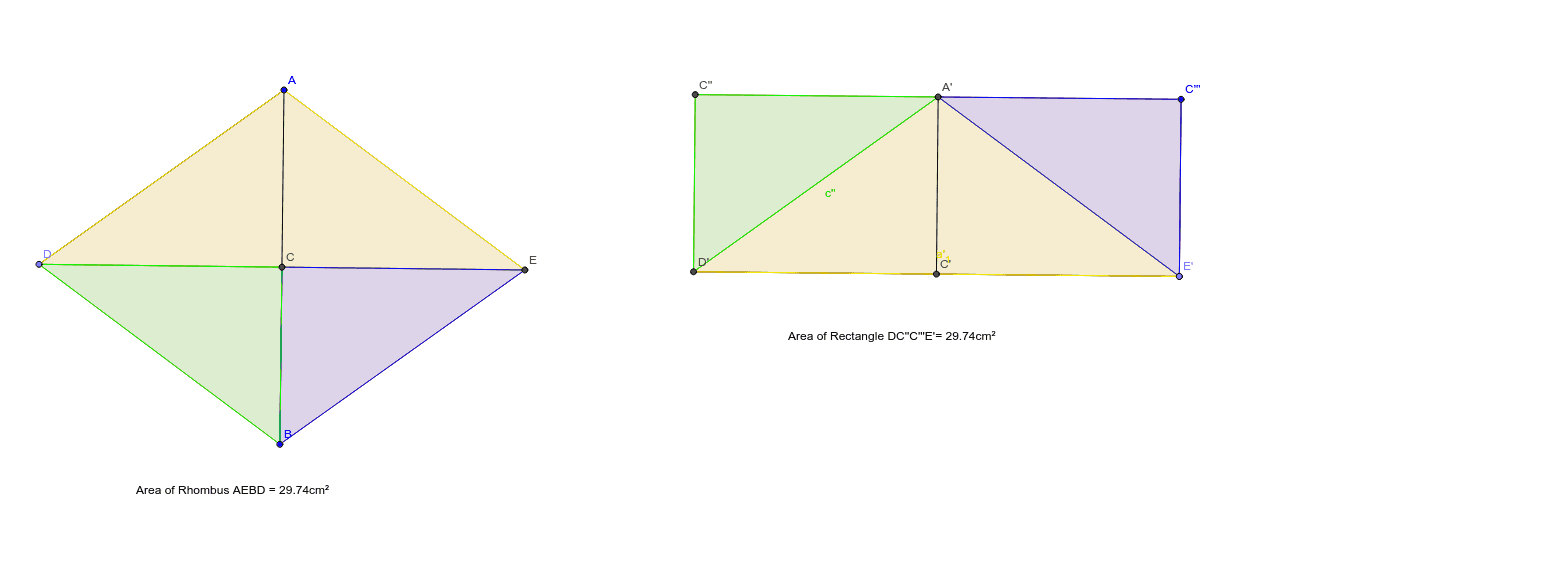
This example demonstrates how a rhombus can be transformed into a rectangle. Key concepts include the properties of rhombuses and rectangles. Using GeoGebra commands such as Segment, LineBisector, Intersect, etc., a rhombus is constructed and transformed. Suitable for middle school and above students to learn geometric transformations and properties of shapes.
GeoGebra Commands & Parameters
Segment(A, B) → aLineBisector(a) → bIntersect(a, b) → CPoint(b) → DSegment(A, D) → cLine(B, c) → dIntersect(d, b) → EPolygon(A, E, B, D) → poly1, a_1, e, b_1, d_1Segment(D, E) → fSegment(F, G) → gMirror(D, g) → E'Mirror(E, g) → D'Segment(E', D') → f'Vector(E, C) → uTranslate(A, u) → A'_1Translate(B, u) → B'Segment(A'_1, B') → a'Segment(A'_1, D) → hMirror(A'_1, g) → C'''Mirror(D, g) → D'_1Segment(C''', D'_1) → h'Line(C''', f') → iLine(D', h') → jIntersect(i, j) → C''Polygon(C'', D', E', C''') → poly2, h_1, e', d', a''LineBisector(a'') → kIntersect(a'', k) → A'Intersect(f', e') → JIntersect(k, f') → C'Segment(D', A') → lSegment(A', E') → mSegment(A', C') → nPointIn(poly1) → Pointpoly1PointIn(poly2) → Pointpoly2Polygon(A, D, E) → poly3, e_1, a_2, d_2Polygon(D', A', E') → poly4, e'_1, d'_1, a'_1Polygon(C, E, B) → poly5, b_2, c_1, e_2Polygon(C''', E', A') → poly6, a'_2, c''', e'_2Polygon(D, C, B) → poly7, b_3, d_3, c_2Polygon(C'', D', A') → poly8, a'_3, c'', d'_2
AI Drawing Prompt Reference
Start with a segment as one side of a rhombus. Construct its perpendicular bisector, intersecting the segment at its midpoint. Pick a point on the bisector as a vertex, and connect it to both endpoints to form a triangle. Through the other endpoint, draw a line parallel to the first side, intersecting the bisector to get the fourth vertex. Connect all four vertices to form the rhombus. Then draw a line of symmetry, reflect one pair of opposite vertices across it to create a new quadrilateral, and use translation and reflection to form a rectangle. Finally, fill the rhombus, rectangle, and intermediate triangles with different colors and label all vertices.
The prompt above was compiled from the original drawing commands and is for reference only.