
Rhombus Construction Demo
Loading the math board and drawing, please wait…
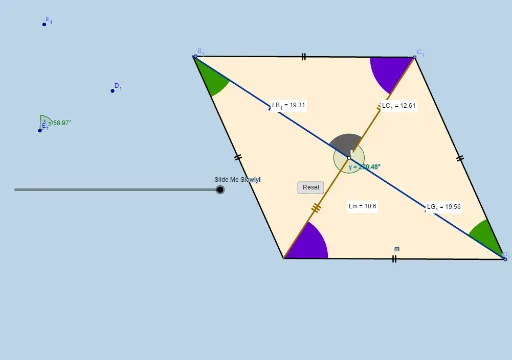
This example demonstrates the geometric construction and properties of a rhombus. It involves core math concepts like polygons, vectors, angles, rotations, and transformations. Key GeoGebra commands used include Circle, Line, Intersect, Rotate, Dilate, and Polygon. Suitable for high school mathematics teaching to understand polygon construction and transformation applications.
GeoGebra Commands & Parameters
Circle(B, A) → fCircle(A, B) → cLine(A, B) → bIntersect(c, b, 2) → CCircleArc(A, B, C) → dPoint(d) → DSegment(D, B) → sCircle(D, A) → eIntersect(e, f, 2) → ESegment(A, E) → nIntersect(n, s) → LSegment(A, B) → aSegment(A, D) → gSegment(D, E) → hSegment(E, B) → iMin(g, h) → jDilate(B, If[0 < l ≤ 1, 1 - l, 0], A) → B'Segment(B, B') → mAngle(E, B, A) → αAngle(D, E, B) → βRotate(B, If[1 < l ≤ 2, ((-(l - 1)) * α), α], B) → B'_1Rotate(B', If[1 < l ≤ 2, ((-(l - 1)) * α), (-α)], B) → B''Segment(B'_1, B'') → m'Rotate(B'_1, If[2 < l ≤ 3, ((-(l - 2)) * β), (-β)], E) → JRotate(B'', If[2 < l ≤ 3, ((-(l - 2)) * β), (-β)], E) → B'''Segment(J, B''') → m''Rotate(J, If[3 < l ≤ 4, ((-(l - 3)) * α), (-α)], D) → J'Rotate(B''', If[3 < l ≤ 4, ((-(l - 3)) * α), (-α)], D) → KSegment(J', K) → m'''Circle(B, (0.2 * j)) → kCircle(E, (0.2 * j)) → pIntersect(p, m'', 1) → FIntersect(p, m', 1) → GIntersect(k, m', 1) → HIntersect(k, m, 1) → ICircleSector(B, H, I) → qCircleSector(E, F, G) → rPolygon(A, B, E, D) → poly1, a_1, b_1, e_1, d_1Dilate(B, If[5 < l ≤ 6, 6 - l, 0], D) → B'_2Vector(B, B'_2) → uTranslate(q, u) → q'Rotate(q', If[6 < l ≤ 7, ((l - 6) * π), 3.141592653589793], D) → q''Dilate(E, If[7 < l ≤ 8, 8 - l, 0], A) → E'Vector(E, E') → vTranslate(r, v) → r'Rotate(r', If[8 < l ≤ 9, ((-(l - 8)) * π), -3.141592653589793], A) → r''Dilate(D, If[9 < l ≤ 10, 10 - l, 0], L) → D'Vector(D, D') → wMin(n / 2, s / 2) → oCircle(L, (0.2 * o)) → tIntersect(t, s, 2) → MIntersect(t, n, 2) → NCircleSector(L, M, N) → c_1Segment(D, D') → f_1Dilate(L, If[10 < l ≤ 11, 11 - l, 0], B) → L'Circle(D, (0.2 * j)) → h_1Intersect(k, s) → P,Intersect(s, f_1) → QIntersect(h_1, s, 1) → OCircle(A, (0.2 * j)) → k_1Intersect(k_1, m, 1) → RIntersect(k_1, n, 1) → SIntersect(k_1, m''', 1) → TIntersect(h_1, m'', 1) → UCircleSector(D, O, U) → q_1Dilate(A, If[11 < l ≤ 12, 12 - l, 0], L) → A'Segment(A, A') → i_1Dilate(L, If[12 < l ≤ 13, 13 - l, 0], E) → L'_1Segment(L, L'_1) → j_1Intersect(p, m'', 1) → VIntersect(p, n, 1) → WCircleSector(A, S, T) → s_1CircleSector(B, P, I) → p_1Intersect(p, m', 1) → ZCircleSector(E, W, Z) → r_1Segment(L, L') → g_1Rotate(L, If[13 < l ≤ 14, ((-(l - 13)) * π), -3.141592653589793], L) → L'_2Rotate(L', If[13 < l ≤ 14, ((-(l - 13)) * π), -3.141592653589793], L) → L''Segment(L'_2, L'') → l_1Rotate(L, If[14 < l ≤ 15, ((-(l - 14)) * π), 3.141592653589793], L) → L'_3Rotate(L'_1, If[14 < l ≤ 15, ((-(l - 14)) * π), 3.141592653589793], L) → A_1Segment(L'_3, A_1) → m_1Rotate(q_1, If[15 < l ≤ 16, ((-(l - 15)) * α / 2), ((-α)) / 2], D) → t_1Rotate(p_1, If[15 < l ≤ 16, ((-(l - 15)) * α / 2), ((-α)) / 2], B) → c_2Rotate(s_1, If[16 < l ≤ 17, ((-(l - 16)) * β / 2), ((-β)) / 2], A) → d_2Rotate(r_1, If[16 < l ≤ 17, ((-(l - 16)) * β / 2), ((-β)) / 2], E) → e_2Rotate(c_1, If[17 < l ≤ 18, ((l - 17) * π / 2), 1.5707963267948966], L) → f_2Point(m'') → B_1Point(m') → C_1Angle(B_1, L, C_1) → γAngle(D_1, E_1, F_1) → δPoint(m) → G_1Distance(L, B_1) → distanceLB1Midpoint(L, B_1) →Distance(L, G_1) → distanceLG1Midpoint(L, G_1) →Distance(L, m) → distanceLmMidpoint(L, ClosestPoint[m, L]) →Distance(L, C_1) → distanceLC1Midpoint(L, C_1) →
AI Drawing Prompt Reference
Draw a rhombus by first creating two intersecting line segments. Use these segments as diameters to draw two circles, and mark their intersection points as the vertices of the rhombus. Connect these points to form the rhombus, then draw its altitudes and angle bisectors. Next, perform a rotation transformation around one of the rhombus's sides to obtain a similar shape. Finally, add decorative arcs and sectors around the figure to enhance its appearance.
The prompt above was compiled from the original drawing commands and is for reference only.