
Rhombus by Steve Trenfield
Loading the math board and drawing, please wait…
In collections
Parallelograms Investigation
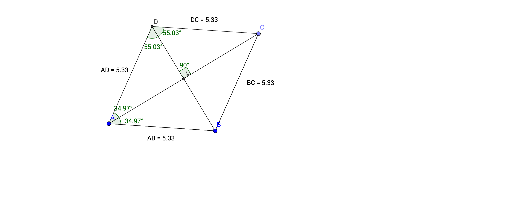
This example demonstrates the construction of a rhombus. Key mathematical concepts include equal sides and angle relationships. GeoGebra commands used include Segment, Distance, Circle, Point, Line, Intersect, and Angle. Suitable for middle school and above students learning geometric construction.
GeoGebra Commands & Parameters
Segment(A, B) → fDistance(A, B) → distanceABCircle(B, A) → cPoint(c) → CSegment(B, C) → gLine(C, f) → hLine(A, g) → iIntersect(h, i) → DSegment(A, D) → jSegment(D, C) → kSegment(C, B) → lSegment(B, A) → mSegment(D, B) → nSegment(A, C) → pDistance(A, D) → distanceADDistance(B, C) → distanceBCDistance(D, C) → distanceDCIntersect(n, p) → MAngle(C, M, D) → αAngle(B, D, C) → βAngle(A, D, B) → γAngle(C, A, D) → δAngle(B, A, C) → ε
AI Drawing Prompt Reference
Draw a rhombus by first creating two equal line segments AB and BC, then drawing a circle with B as the center and AB as the radius, finding the intersection point C of the circle and line segment AB, drawing line segment BC, then drawing a line through C parallel to AB, and finding the intersection point D with a line through A parallel to BC, finally drawing line segments AD, DC, CB, and DA to ensure all sides are equal and form a rhombus.
The prompt above was compiled from the original drawing commands and is for reference only.