
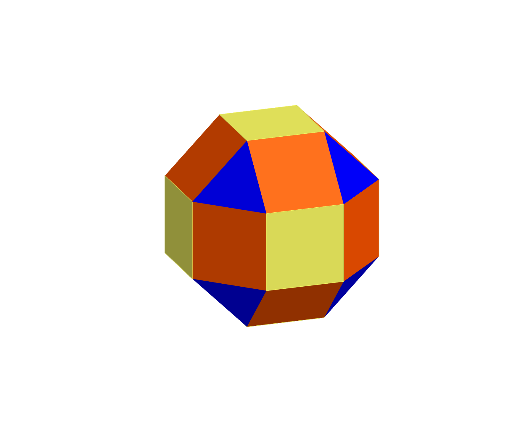
Rhombicuboctahedron
Loading the math board and drawing, please wait…
In collections
Archimedean Solids
This example demonstrates the construction of a rhombicuboctahedron. It involves key concepts of cubes, squares, and solid geometry. Using GeoGebra commands such as Point, Rotate, Distance, etc., this polyhedron can be constructed. Suitable for middle school and above students or teachers.
GeoGebra Commands & Parameters
Point(xAxis) → IRotate(I, 45°, zAxis) → I'Rotate(I', 45°, zAxis) → I''Rotate(I'', 45°, zAxis) → I'''Rotate(I''', 45°, zAxis) → ARotate(A, 45°, zAxis) → A'Rotate(A', 45°, zAxis) → A''Rotate(A'', 45°, zAxis) → A'''Distance(A, A') → dLine(I''', zAxis) → fLine(A, zAxis) → gLine(A', g) → hLine(A'', h) → iLine(A''', g) → jLine(I, f) → kLine(I', k) → lLine(I'', f) → mIntersect(k, p) → BIntersect(l, p) → CIntersect(m, p) → DIntersect(f, p) → EIntersect(g, p) → FIntersect(h, p) → GIntersect(i, p) → HIntersect(j, p) → JIntersect(l, q) → KIntersect(m, q) → LIntersect(f, q) → MIntersect(g, q) → NIntersect(h, q) → OIntersect(i, q) → PIntersect(j, q) → QIntersect(k, q) → RSegment(E, F) → nPolygon(E, M, N, F) → q1, e, m_1, n_1, f_1Rotate(q1, 90°, zAxis) → q1'Rotate(q1, 180°, zAxis) → q1'_{1}Rotate(q1, 270°, zAxis) → q1'_{2}Polygon(D, L, M, E) → q2, d_1, l_1, m_2, e_1Rotate(q2, 90°, zAxis) → q2'Rotate(q2, 180°, zAxis) → q2'_{1}Rotate(q2, 270°, zAxis) → q2'_{2}Line(C, D) → rRotate(K, 135°, r) → K'Rotate(L, 135°, r) → L'Polygon(K', C, D, L') → q3, k', c, d_2, l'Rotate(q3, 90°, zAxis) → q3'Rotate(q3', 90°, zAxis) → q3''Rotate(q3'', 90°, zAxis) → q3'''Rotate(L', 90°, zAxis) → L''Rotate(L'', 90°, zAxis) → L'''Polygon(L', D, E) → t1, e_2, s, d_3Rotate(t1, 90°, zAxis) → t1'Rotate(t1', 90°, zAxis) → t1''Rotate(t1'', 90°, zAxis) → t1'''Polygon(L', L'', L''', K') → q4, t, l'', l''', aMirror(t1', g_1) → t1''_{1}Mirror(q3'', g_1) → q3'''_{1}Mirror(t1'', g_1) → t1'''_{1}Mirror(q4, g_1) → q4'Mirror(q3''', g_1) → q5Mirror(t1''', g_1) → t2Mirror(q3, g_1) → q3'_{1}Mirror(t1, g_1) → t1'_{1}Mirror(q3', g_1) → q3''_{1}
AI Drawing Prompt Reference
Draw a rhombicuboctahedron by first rotating point I to generate point A, then rotating A around the z-axis to create a series of points. Calculate the distances between these points and use them to construct polygons. Finally, apply rotation and mirroring operations to generate all faces of the rhombicuboctahedron.
The prompt above was compiled from the original drawing commands and is for reference only.