
Representing a Hole in a Prism: Quarto Piece Model
Loading the math board and drawing, please wait…
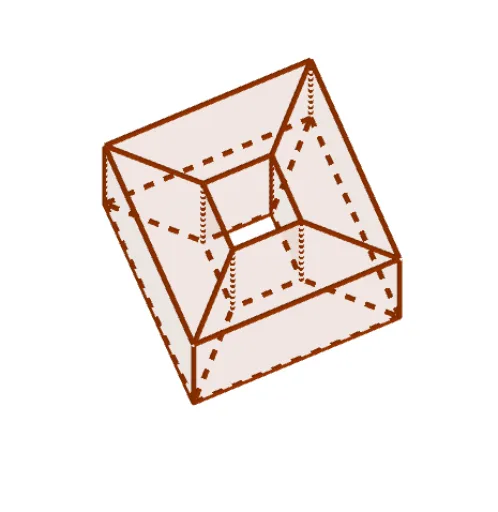
This example demonstrates how to construct a through-hole inside a prism, using a 'quarto piece' as a visual reference to explore the modeling of hollow structures in solid geometry. The core mathematical concepts include prism volume, cross-sections, and Boolean-like operations on polyhedra, achieved by combining polygon and prism commands. Construction highlights: using GeoGebra's Polygon command to define base polygons (e.g., A, B, C, D), then the Prism command to generate the prism; auxiliary points (F, G, H, I, etc.) and auxiliary polygons (q1 to q5) are used to outline the internal hole, with faces (e.g., faceAIMN) connecting to form the hollow interior. This example is suitable for upper secondary or early university students learning solid geometry, to understand how holes are represented in 3D, and can also be used for mathematical modeling or pre-3D-printing geometric verification.
GeoGebra Commands & Parameters
Polygon(A, B, C, D) → q1, a, b, c, dPolygon(I, A, D, H) → q2, i, a_1, d_1, hPolygon(I, A, B, F) → q3, i_1, a_2, b_1, fPolygon(D, H, G, C) → q4, d_2, h_1, g, c_1Polygon(B, C, G, F) → q5, b_2, c_2, g_1, f_1Prism(q3, j) → k, M, edgeIM, edgeAN, edgeBO, edgeFP, edgeMN, edgeNO, edgeOP, edgeMP, N, O, P, faceAIMN, faceABON, faceBFPO, faceFIMP, faceMNOPPrism(q2, l) → m, Q, edgeIQ, edgeAR, edgeDS, edgeHT, edgeQR, edgeRS, edgeST, edgeQT, R, S, T, faceAIQR, faceADSR, faceDHTS, faceHIQT, faceQRSTPrism(q4, n) → o, U, edgeDU, edgeHV, edgeGW, edgeCZ, edgeUV, edgeVW, edgeWZ, edgeUZ, V, W, Z, faceDHVU, faceGHVW, faceCGWZ, faceCDUZ, faceUVWZPrism(q5, p) → q, A_1, edge1, edge2, edge4, edge3, edge5, edge7, edge8, edge6, B_1, C_1, D_1, face1, face3, face4, face2, face5Polygon(W, G, H, V) → q6, w, g_2, h_2, vPolygon(V, H, I, Q) → q7, v_1, h_3, i_2, q_1Polygon(Q, I, F, P) → q8, q_2, i_3, f_2, p_1Polygon(P, W, G, F) → q9, p_2, w_1, g_3, f_3Polygon(A, R, U, D) → q10, a_3, r, u, d_3Polygon(U, Z, C, D) → q11, u_1, z_1, c_3, d_4Polygon(Z, O, B, C) → q12, z_2, o_1, b_3, c_4Polygon(O, R, A, B) → q13, o_2, r_1, a_4, b_4Polygon(P, O, Z, W) → q14, p_3, o_3, z_3, w_2Polygon(P, O, R, Q) → q15, p_4, o_4, r_2, q_3Polygon(R, Q, V, U) → q16, r_3, q_4, v_2, u_2Polygon(Z, U, V, W) → q17, z_4, u_3, v_3, w_3Polygon(G, C, D, H) → q18, g_4, c_5, d_5, h_4Polygon(G, C, B, F) → q19, g_5, c_6, b_5, f_4Polygon(D, H, I, A) → q20, d_6, h_5, i_4, a_5Polygon(B, A, I, F) → q21, b_6, a_6, i_5, f_5
AI Drawing Prompt Reference
Draw a prism with a through-hole. Start by creating a quadrilateral as the base of the prism and extend it upward to form the prism. Then, inside the prism, draw several auxiliary polygons that combine to form the shape of the hole. Finally, extend these auxiliary polygons to create faces that connect to the sides of the prism, resulting in a hollow 3D structure.
The prompt above was compiled from the original drawing commands and is for reference only.