
Relative Area of the Middle Quadrilateral
Loading the math board and drawing, please wait…
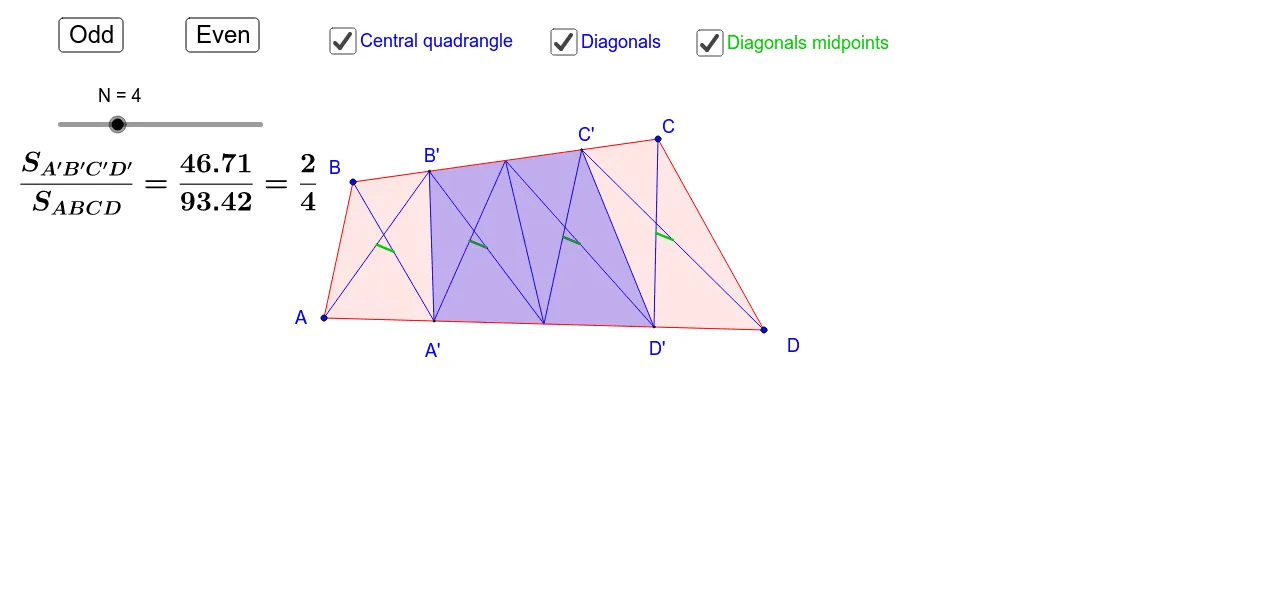
This GeoGebra example demonstrates the relative area of a middle quadrilateral within a larger partitioned figure, showing how its area compares to the whole. The core mathematical concepts involve area ratios, polygon subdivision, and dynamic correlation in geometry. The construction uses commands such as Sequence, Element, and Polygon to create multiple polygons and point lists, with sliders (like כפתור1 and כפתור2) controlling parameters to animate changes. Suitable for high school or college students, it helps explore area proportions, geometric transformations, and dynamic visualization. By dragging sliders, learners can observe whether the area ratio remains constant or varies, deepening understanding of the interplay between geometry and algebra.
GeoGebra Commands & Parameters
Sequence((B * n) + (C * (1 - n)), n, 1 / e, 1 - 1 / e, 1 / e) → list1Element(list1, e / 2 + 0.5) → B'Element(list1, e / 2 - 0.5) → C'Sequence((A * n) + (D * (1 - n)), n, 1 / e, 1 - 1 / e, 1 / e) → list2Element(list2, e / 2 + 0.5) → A'Element(list2, e / 2 - 0.5) → D'Polygon(A, B, C, D) → poly1, a, b, c, dPolygon(A', B', C', D') → poly2, f, g, h, iSequence(Segment[Element[list1, p], Element[list2, p]], p, 1, e - 1) → list3Element(list1, (e - 2) / 2) → EElement(list2, (e - 2) / 2) → FPolygon(A', B', E, F) → poly3, a', b', e_1, f_1Sequence((A * n) + (D * (1 - n)), n, 0, 1, 1 / e) → list5Sequence((B * n) + (C * (1 - n)), n, 0, 1, 1 / e) → list4Sequence(Segment[Element[list4, n], Element[list5, n + 1]], n, 1, e) → list6Sequence(Segment[Element[list5, n], Element[list4, n + 1]], n, 1, e) → list7Sequence(Segment[Midpoint[Element[list6, n]], Midpoint[Element[list7, n]]], n, 1, e) → list8
AI Drawing Prompt Reference
Draw a large quadrilateral. Subdivide each side into equal segments and connect corresponding points to create a grid of smaller quadrilaterals inside. Select a central quadrilateral whose vertices lie at intersections of the grid lines. Connect its vertices to points on the outer quadrilateral's sides with line segments, forming additional partitions. Include two sliders to control the subdivision density and the central quadrilateral's position, allowing dynamic observation of how its area compares to the whole. Highlight the central quadrilateral and show all grid lines clearly.
The prompt above was compiled from the original drawing commands and is for reference only.