
Regular Pyramid
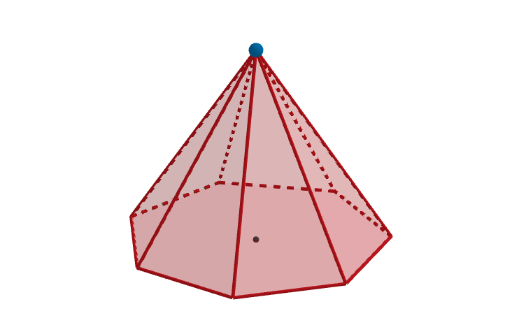
Loading the math board and drawing, please wait…
In collections
The GeoGebra's Toolbox for Teachers and Students
This interactive example demonstrates a regular pyramid shape for teaching and learning with GeoGebra. It is part of the Toolbox collection. By dragging the sliders for the base side length and height, the shape and size of the pyramid can be changed. The underlying math concepts include geometry, solid geometry, plane geometry, and geometric transformations. The construction involves using GeoGebra's Sequence, Polygon, Circle, Segment, Point, and Pyramid commands. Suitable for middle school and high school students, this example is designed to help learn concepts of solids and solid geometry.
GeoGebra Commands & Parameters
Sequence(Rotate[K + (r, 0), ((k * 2) * pi / n), K], k, 0, n) → verticesPolygon(vertices) → poli1Circle(K, r) → eSequence(Segment[Element[vertices, k], Element[vertices, k + 1]], k, 1, n) → sidesSegment((0, 0, 0), (0, 0, 7)) → hPoint(h) → PPyramid(poli1, P) → b, face10, edge15, edge16, edge17, edge18, edge19, edge20, edge21, edge1, edge2, face12, face13, face14, face15, face16, face11, face1, face2
AI Drawing Prompt Reference
Draw a regular square pyramid. The shape consists of a square base and a vertex above the base. The base is a square, and the vertex is positioned directly above the center of the base. You can change the size and shape by adjusting the base side length and height. Make sure the pyramid is clearly visible, with lines connecting the base to the vertex to represent the edges.
The prompt above was compiled from the original drawing commands and is for reference only.