
Regular Pyramid Nets
Loading the math board and drawing, please wait…
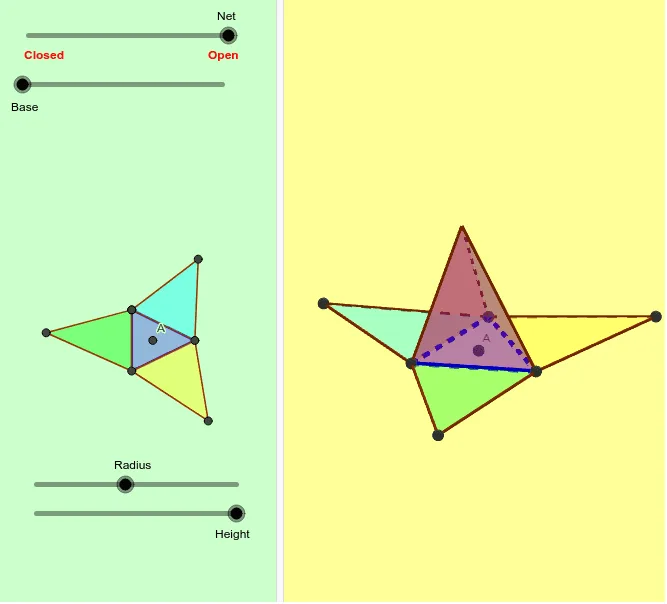
This example demonstrates the net of a regular pyramid. Key mathematical concepts include polygons, triangles, and solid geometry. Using GeoGebra commands such as Intersect, Sequence, Circle, Polygon, Pyramid, and Net, the net of a regular pyramid can be constructed. Suitable for middle and high school students learning solid geometry and geometric construction.
GeoGebra Commands & Parameters
Intersect(xAxis, yAxis) → ASequence(((r * cos(((2 * π / n) * k))), (r * sin(((2 * π / n) * k))), 0), k, 1, n + 1) → l1Circle(A, r) → cSequence(Segment[Element[l1, i], Element[l1, i + 1]], i, 1, n) → l2Sequence(Segment[Element[l1, i], (0, 0, h)], i, 1, n) → l3Polygon(l1) → q1Pyramid(q1, h) → a, C, face9, face10, face11, edge1, edge2, edge3, edge4, edge5, edge6, edge7, face1, edge8, edge9, edge10, edge11, face3, face4, face5, face6, face7, face2, face8Intersect(edge5, edge6) → DNet(a, b) → d, E, W, A_1, J, K, L, M, N, P, R, T, F, V, Z, B_1, faceEFGHI, faceEFJ, faceFGK, faceGHL, faceHIM, faceEIN, face12, G, face13, face14, face15, face16, face17, edgeEF, edgeFG, edgeGH, edgeHI, edgeEI, H, edge12, edge15, edge18, edge21, edge24, edge27, edgeEJ, edgeFJ, edgeFK, edgeGK, I, edgeGL, edgeHL, edgeHM, edgeIM, edgeIN, edgeEN, edge13, edge14, edge16, edge17, O, edge19, edge20, edge22, edge23, edge25, edge26, edge28, edge29, Q, S, U
AI Drawing Prompt Reference
Draw the net of a regular pyramid by first creating a circle centered at the origin, then drawing the sides of a regular polygon, connecting each vertex to the center to form triangles, and finally combining these triangles with the polygon to shape a cone, displaying its unfolded layout.
The prompt above was compiled from the original drawing commands and is for reference only.