
Regular Polygons by sonom
Loading the math board and drawing, please wait…
In collections
Regular Polygons
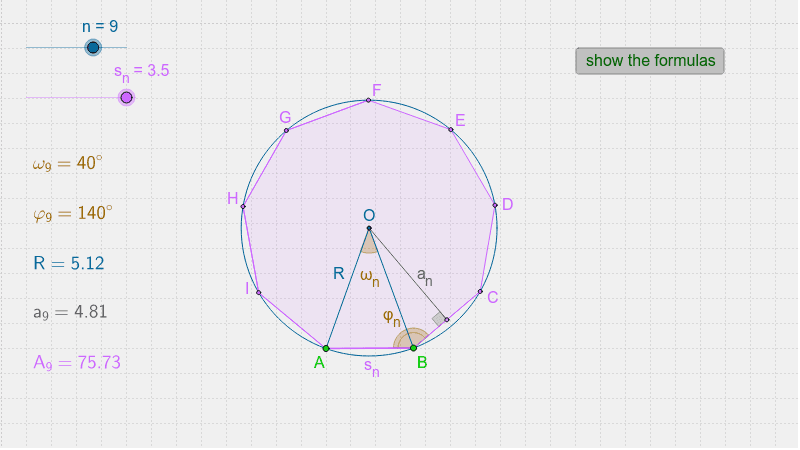
This example demonstrates the construction of regular polygons. Key mathematical concepts include polygons, circles, angles, and vectors. Using GeoGebra commands such as Point, Segment, Polygon, Midpoint, Centroid, etc., one can dynamically construct regular polygons. Suitable for students at the junior high school level and above for geometric construction.
GeoGebra Commands & Parameters
Point(Circle[A, s_n]) → BSegment(A, B) → λ_νPolygon(A, B, n) → poly1, b, s, t, a_1, C, D, E, F, G, H, I, c, J, K, L, d, j, l, n_1, p, q, rMidpoint(C, B) → SCentroid(poly1) → OSegment(A, O) → RSegment(O, B) → hCircle(O, A) → kSegment(O, S) → a_nAngle(O, S, B) → αAngle(A, O, B) → ω_nAngle(A, B, C) → φ_n
AI Drawing Prompt Reference
Draw a regular polygon by first drawing a circle with point A as the center and point B on the circumference, then connecting points A and B. Next, draw a regular polygon with point A as the center and point B as one of its vertices. Find the center O of the polygon, connect points A and O, then connect O and B. Draw a circle with O as the center and A as the radius, and draw the line segment from O to the midpoint S of AB. Measure angles α and ω, and finally measure angle φ.
The prompt above was compiled from the original drawing commands and is for reference only.