
Regular Polygon Phenomena 3
Loading the math board and drawing, please wait…
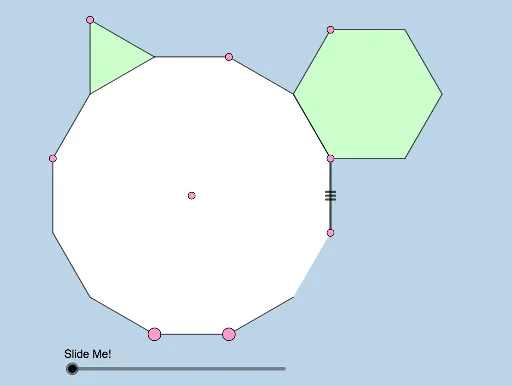
This example demonstrates the construction of regular polygons and their rotational symmetry phenomena. Core math concepts include regular polygons, rotation, central symmetry, and angle calculations. It utilizes GeoGebra commands/objects like Polygon, Segment, Circle, Intersect, Center, Dilate, Angle, and Rotate. Suitable for high school students studying geometric transformations, symmetry, and polygon properties.
GeoGebra Commands & Parameters
Polygon(A, B, 12) → poly1, f, p, q, r, C, D, E, F, G, H, I, g, J, K, L, h, i, j, k, l, m, nSegment(G, D) → s_2Polygon(F, E, 6) → poly2, a_1, U, c_1, d_1, e_1, i_2, k_2, N, O, TCircle(G, Distance[U, E]) → c_2Intersect(c_2, s_2, 1) → WPolygon(I, H, 3) → poly5, n_1, p_1, q_1, VSegment(A, B) → sSegment(B, C) → tSegment(A, L) → aSegment(L, K) → bSegment(K, J) → cSegment(J, I) → j_1Segment(I, H) → k_1Segment(H, G) → l_1Segment(G, F) → m_1Segment(F, E) → t_1Segment(E, D) → b_1Center(Circle[J, I, H]) → MSegment(I, V) → r_1Segment(V, H) → s_1Segment(E, N) → eSegment(N, O) → f_1Segment(O, T) → g_1Segment(T, U) → h_1Segment(U, F) → i_1Segment(F, E) → f_2Dilate(M, If[0 < d ≤ 1, 1 - d, 0], G) → M'Segment(M, M') → l_2Dilate(G, If[1 < d ≤ 2, 2 - d, 0], V) → G'Dilate(V, If[2 < d ≤ 3, 3 - d, 0], J) → V'Segment(V, V') → m_2Dilate(J, If[3 < d ≤ 4, 4 - d, 0], M) → J'Angle(V, G, M) → αAngle(G, M, J) → βAngle(M, J, V) → γDilate(V, If[1 < d ≤ 2, 2 - d, 0], G) → V'_1Segment(V, V'_1) → g_2Dilate(M, If[2 < d < 3, 3 - d, 0], J) → M'_1Segment(M, M'_1) → n_2Rotate(M, If[3.5 < d ≤ 4.5, ((d - 3.5) * π / 2), π / 2], M) → M'_2Rotate(M', If[3.5 < d ≤ 4.5, ((d - 3.5) * π / 2), π / 2], M) → M''Segment(M'_2, M'') → p_2Rotate(M'_2, If[4.5 < d ≤ 5.5, ((d - 4.5) * π / 2), π / 2], J) → RRotate(M'', If[4.5 < d ≤ 5.5, ((d - 4.5) * π / 2), π / 2], J) → M'''Segment(R, M''') → q_2Rotate(R, If[5.5 < d ≤ 6.5, ((d - 5.5) * π / 2), π / 2], V) → R'Rotate(M''', If[5.5 < d ≤ 6.5, ((d - 5.5) * π / 2), π / 2], V) → SSegment(R', S) → r_2Dilate(G, If[7 < d ≤ 8, 8 - d, 0], W) → G'_1Polygon(J, M, G, V) → q1, j_3, m_3, g_3, vSegment(G, G'_1) → h_2Dilate(W, If[8 < d ≤ 9, 9 - d, 0], D) → W'Segment(W, W') → t_2Dilate(U, If[7 < d ≤ 9, (0.5 * (9 - d)), 0], E) → U'Segment(U, U') → a_2Rotate(U, If[10 < d ≤ 11, ((d - 10) * π / 6), π / 6], D) → U'_1Rotate(U', If[10 < d ≤ 11, ((d - 10) * π / 6), π / 6], D) → U''Segment(U'_1, U'') → b_2Rotate(E, If[10 < d ≤ 11, ((d - 10) * π / 6), π / 6], D) → E'Rotate(D, If[10 < d ≤ 11, ((d - 10) * π / 6), π / 6], D) → D'Segment(E', D') → d_2
AI Drawing Prompt Reference
Draw a regular dodecagon and demonstrate its rotational symmetry. Start by constructing a regular dodecagon, then draw a circle centered at the midpoint of one of its sides. Find points on this circle corresponding to the vertices of the dodecagon and connect them to form a smaller regular hexagon. Next, draw a circle centered at one vertex of the hexagon, intersecting the larger circle at two points. Connect these points to a vertex of the dodecagon to form a smaller equilateral triangle. Finally, use rotation and scaling to illustrate the rotational symmetry of the dodecagon.
The prompt above was compiled from the original drawing commands and is for reference only.