
Regular Pentagon Wonder: GoGeometry Action 192!
Loading the math board and drawing, please wait…
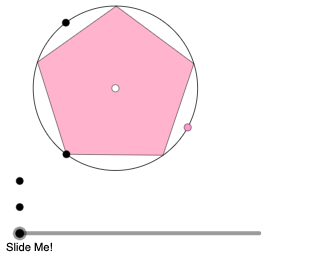
This example demonstrates the fascinating properties of a regular pentagon. It involves key mathematical concepts such as geometry and complex numbers. Using GeoGebra commands like Circle, Point, Rotate, and Polygon, the construction of a regular pentagon and its related properties is illustrated. Suitable for high school geometry learners and math enthusiasts.
GeoGebra Commands & Parameters
Circle(A, B) → cPoint(c) → CRotate(C, (2 * π / 5), A) → C'Polygon(C, C', 5) → poly1, f, g, h, i, j, D, E, FCircleArc(A, E, F) → dCircleArc(A, F, E) → ePoint(d) → GDilate(G, If[0 < a ≤ 2, 1 - (0.5 * a), 0], F) → G'Dilate(G, If[0 < a ≤ 2, 1 - (0.5 * a), 0], C) → G'_{1}Dilate(G, If[0 < a ≤ 2, 1 - (0.5 * a), 0], C') → G'_{2}Dilate(G, If[0 < a ≤ 2, 1 - (0.5 * a), 0], D) → G'_{3}Dilate(G, If[0 < a ≤ 2, 1 - (0.5 * a), 0], E) → G'_{4}Segment(G, G') → kSegment(G, G'_{1}) → lSegment(G, G'_{2}) → mSegment(G, G'_{3}) → nSegment(G, G'_{4}) → pSegment(D, E) → rSegment(E, F) → sSegment(F, C) → tSegment(C, C') → bSegment(C', D) → f_1Dilate(F, If[4 < a ≤ 5, 5 - a, 0], H) → F'Vector(F, F') → uTranslate(G, u) → G'_{5}Translate(G', u) → G''Segment(G'_{5}, G'') → k'Point(h_1) → JAngle(J, F', G'_{5}) → αRotate(G'_{5}, If[4 < a ≤ 5, ((-(a - 4)) * α), (-α)], G'') → KRotate(G'', If[4 < a ≤ 5, ((-(a - 4)) * α), (-α)], G'') → G'''Segment(K, G''') → k''Dilate(G, If[5 < a ≤ 6, 6 - a, 0], K) → G'_{6}Vector(G, G'_{6}) → vPoint(p_1) → LAngle(C', G, L) → βTranslate(G, v) → G'_{7}Translate(G'_{2}, v) → MSegment(G'_{7}, M) → m'Rotate(G'_{7}, If[5 < a ≤ 6, ((a - 5) * β), β], G'_{6}) → NRotate(M, If[5 < a ≤ 6, ((a - 5) * β), β], G'_{6}) → M'Segment(N, M') → m''Dilate(G, If[6 < a ≤ 7, 7 - a, 0], M') → G'_{8}Vector(G, G'_{8}) → wTranslate(G, w) → G'_{9}Translate(G'_{4}, w) → OSegment(G'_{9}, O) → p'Angle(E, G, L) → γRotate(G'_{9}, If[6 < a ≤ 7, ((a - 6) * γ), γ], G'_{9}) → PRotate(O, If[6 < a ≤ 7, ((a - 6) * γ), γ], G'_{9}) → O'Segment(P, O') → p''Dilate(C, If[9 < a ≤ 10, 10 - a, 0], I) → C'_{1}Vector(C, C'_{1}) → u_1Translate(G, u_1) → G'_{10}Translate(G'_{1}, u_1) → QSegment(G'_{10}, Q) → l'Point(q_1) → RAngle(R, C, G) → δRotate(G'_{10}, If[9 < a ≤ 10, ((-(a - 9)) * δ), (-δ)], Q) → SRotate(Q, If[9 < a ≤ 10, ((-(a - 9)) * δ), (-δ)], Q) → Q'Segment(S, Q') → l''Dilate(G, If[10 < a ≤ 11, 11 - a, 0], S) → G'_{11}Vector(G, G'_{11}) → v_1Translate(G, v_1) → G'_{12}Translate(G'_{3}, v_1) → TSegment(G'_{12}, T) → n'Angle(D, G, L) → εRotate(G'_{12}, If[10 < a ≤ 11, ((a - 10) * ε), ε], G'_{12}) → URotate(T, If[10 < a ≤ 11, ((a - 10) * ε), ε], G'_{12}) → T'Segment(U, T') → n''Dilate(I, If[13 < a ≤ 14, 14 - a, 0], H) → I'Vector(I, I') → w_1Translate(S, w_1) → S'Translate(Q', w_1) → Q''Segment(S', Q'') → l'''Translate(U, w_1) → U'Translate(T', w_1) → T''Segment(U', T'') → n'''
AI Drawing Prompt Reference
Draw a regular pentagon and illustrate its relationship with a circle. Start by drawing a circle and mark five equally spaced points on its circumference to form the pentagon. Then, draw two arcs from one vertex connecting to its adjacent vertices. Mark the intersection points on the arcs and perform a series of dilation and rotation operations to generate new points and lines. Finally, connect these points and lines to create a complex geometric pattern.
The prompt above was compiled from the original drawing commands and is for reference only.