
Reflections Activity
Loading the math board and drawing, please wait…
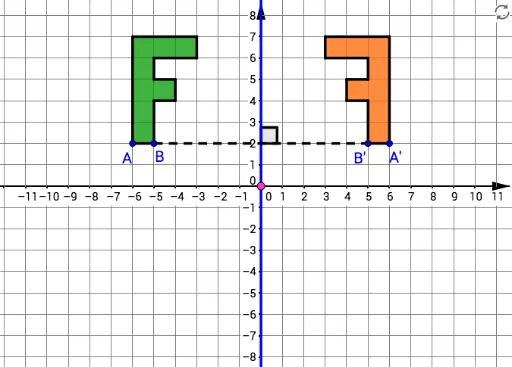
This example demonstrates the reflection transformation of points, lines, and polygons along lines, showing coordinate changes. Core math concepts include reflection, geometric transformations, coordinates, and vectors. It uses commands like Polygon, OrthogonalLine, Mirror, Line, Segment, and Angle in GeoGebra for construction. Suitable for middle school and above students learning geometric transformations and coordinate geometry.
GeoGebra Commands & Parameters
Polygon(A, B, 4) → poly1, f, g, h, i, C, DPolygon(D, C, 4) → poly2, j, k, l, m, E, FPolygon(F, E, 4) → poly3, n, p, q, r, G, HPolygon(H, G, 4) → poly4, s, t, a, b, I, JPolygon(J, I, 4) → poly5, c, d, e, f_1, K, LPolygon(K, I, 4) → poly6, g_1, h_1, i_1, j_1, M, NPolygon(N, M, 4) → poly7, k_1, l_1, m_1, n_1, O, PPolygon(G, E, 4) → poly8, p_1, q_1, r_1, s_1, Q, RPolygon(A, L, P, O, I, G, R, Q, E, B) → poly9, a_1, b_1, l_2, p_2, o, i_2, g_2, r_2, q_2, e_1OrthogonalLine(T, xAxis) → f_2OrthogonalLine(S, yAxis) → h_2Mirror(A, f_2) → A'Mirror(L, f_2) → L'Mirror(P, f_2) → P'Mirror(O, f_2) → O'Mirror(I, f_2) → I'Mirror(G, f_2) → G'Mirror(R, f_2) → R'Mirror(Q, f_2) → Q'Mirror(E, f_2) → E'Mirror(B, f_2) → B'Polygon(A', L', P', O', I', G', R', Q', E', B') → poly9', a', b', l', p', o', i', g', r', q', e'Mirror(A, h_2) → A''Mirror(L, h_2) → L'_1Mirror(P, h_2) → P'_1Mirror(O, h_2) → O'_1Mirror(I, h_2) → I'_1Mirror(G, h_2) → G'_1Mirror(R, h_2) → R'_1Mirror(Q, h_2) → Q'_1Mirror(E, h_2) → E'_1Mirror(B, h_2) → B''Polygon(A'', L'_1, P'_1, O'_1, I'_1, G'_1, R'_1, Q'_1, E'_1, B'') → poly9'_1, a'_1, b'_1, l'_1, p'_1, o'_1, i'_1, g'_1, r'_1, q'_1, e'_1Mirror(A, t_1) → A'''Mirror(L, t_1) → L'_2Mirror(P, t_1) → P'_2Mirror(O, t_1) → O'_2Mirror(I, t_1) → I'_2Mirror(G, t_1) → G'_2Mirror(R, t_1) → R'_2Mirror(Q, t_1) → Q'_2Mirror(E, t_1) → E'_2Mirror(B, t_1) → B'''Polygon(A''', L'_2, P'_2, O'_2, I'_2, G'_2, R'_2, Q'_2, E'_2, B''') → poly9'_2, a'_2, b'_2, l'_2, p'_2, o'_2, i'_2, g'_2, r'_2, q'_2, e'_2Line(U, V) → j_2Mirror(A, j_2) → A''''Mirror(L, j_2) → L'_3Mirror(P, j_2) → P'_3Mirror(O, j_2) → O'_3Mirror(I, j_2) → I'_3Mirror(G, j_2) → G'_3Mirror(R, j_2) → R'_3Mirror(Q, j_2) → Q'_3Mirror(E, j_2) → E'_3Mirror(B, j_2) → B''''Polygon(A'''', L'_3, P'_3, O'_3, I'_3, G'_3, R'_3, Q'_3, E'_3, B'''') → poly9'_3, a'_3, b'_3, l'_3, p'_3, o'_3, i'_3, g'_3, r'_3, q'_3, e'_3Segment(B, B') → k_2Angle(k_2, f_2) → αSegment(B, B'') → m_2Angle(m_2, h_2) → βSegment(B, B''') → n_2Angle(n_2, t_1) → γSegment(B, B'''') → s_2Angle(s_2, j_2) → δ
AI Drawing Prompt Reference
Draw a polygon with points A, L, P, O, I, G, R, Q, E, and B, then reflect it three times using the x-axis, y-axis, and line j2 to generate new polygons A', L', P', O', I', G', R', Q', E', and B', A'', L'_1, P'_1, O'_1, I'_1, G'_1, R'_1, Q'_1, E'_1, and B'', A''', L'_2, P'_2, O'_2, I'_2, G'_2, R'_2, Q'_2, E'_2, and B''' and show these reflected polygons.
The prompt above was compiled from the original drawing commands and is for reference only.