
Reflection Triangle for Points on Euler Line
Loading the math board and drawing, please wait…
In collections
A Tour of Triangle Geometry
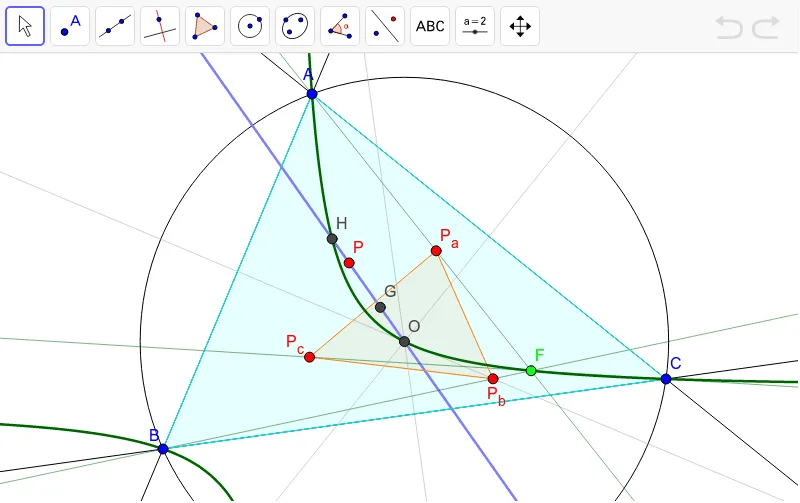
This example demonstrates the triangle formed by the reflections of a point on the Euler line in the perpendicular bisectors of the sides of a triangle. Key concepts include reflection, the Euler line, and perpendicular bisectors. GeoGebra commands used include Centroid, Circle, LineBisector, Mirror, and Polygon. Suitable for high school geometry.
GeoGebra Commands & Parameters
Centroid(Polygon[A, B, C]) → GCircle(A, C, B) → gCenter(g) → OLine(G, O) → kLine(A, B) → aLine(B, C) → bLine(C, A) → cLineBisector(B, C) → dLineBisector(A, C) → eLineBisector(B, A) → fPoint(k) → PMirror(P, e) → P_bMirror(P, d) → P_aMirror(P, f) → P_cPolygon(P_a, P_b, P_c) → poly1, p_c, p_a, p_bLine(A, P_a) → hLine(B, P_b) → iLine(P_c, C) → jIntersect(h, i) → FLocus(F, P) → loc1Polygon(A, B, C) → poly2, c_1, a_1, b_1OrthogonalLine(A, b) → lOrthogonalLine(B, b_1) → mIntersect(l, m) → H
AI Drawing Prompt Reference
Draw a triangle ABC, then choose a point P on the Euler line. Reflect P over the perpendicular bisectors of BC, AC, and AB to get points P_a, P_b, and P_c respectively. Connect P_a, P_b, and P_c to form triangle P_aP_bP_c. Then, draw lines from A to P_a, B to P_b, and C to P_c, and find their intersection point F. Finally, use F and P to create locus loc1.
The prompt above was compiled from the original drawing commands and is for reference only.