
Reflection Transformation and Polygon Demo
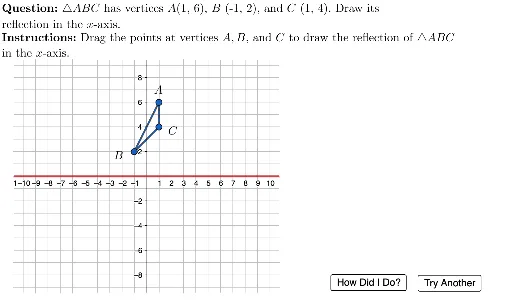
Loading the math board and drawing, please wait…
This example demonstrates the reflection transformation of polygons in 2D space and their geometric properties. It involves core math concepts like vectors, geometric transformations, and coordinate geometry. Constructed using GeoGebra commands such as If, Mirror, Point, Random, Polygon, etc., for dynamic reflection and polygon generation. Suitable for high school mathematics teaching to visually understand vector operations and geometric transformations.
GeoGebra Commands & Parameters
If(Random[0, 1] ≟ 0, 0, -9) → vShiftMirror(A, xAxis) → AcorrMirror(C, xAxis) → CcorrMirror(B, xAxis) → BcorrFlatten(Sequence[Sequence[(i, j), i, -10, 10, 1], j, -9, 9, 1]) → GridSpacePoint(Union[GridSpace, {Element[PointSpace, 1]}]) → A1Point(Union[GridSpace, {Element[PointSpace, 2]}]) → B1Point(Union[GridSpace, {Element[PointSpace, 3]}]) → C1Random(1, 3) → vertexindexPolygon({A, B, C}) → ABCPolygon({A1, B1, C1}) → ABC1Polygon({Acorr, Bcorr, Ccorr}) → ABCcorrLaTeX((((("\text{\textbf{Question: }" * MainInstruc) * "\\\textbf{Instructions: }") * SpecInstruc) * "}")) → allInstrucUnicodeToLetter(10007) → xmarkUnicodeToLetter(10003) → cmarkPolygon({A1, B1, C1}) → ABC1shadow
AI Drawing Prompt Reference
Create a 2D coordinate plane with a grid background. Randomly place three points to form a triangle, then reflect this triangle across the horizontal axis to create a mirrored triangle, shown with dashed lines or a distinct color. Additionally, randomly select three other points on the grid to form a second triangle, and give it a semi-transparent shadow. Highlight one random vertex of the original triangle. Include coordinate axes and grid lines, and add a text area with instructions and a question. The layout should clearly show the original, reflected, and random triangles with their spatial relationships.
The prompt above was compiled from the original drawing commands and is for reference only.