
Reflection Tessellation Rhombus Step 2
Loading the math board and drawing, please wait…
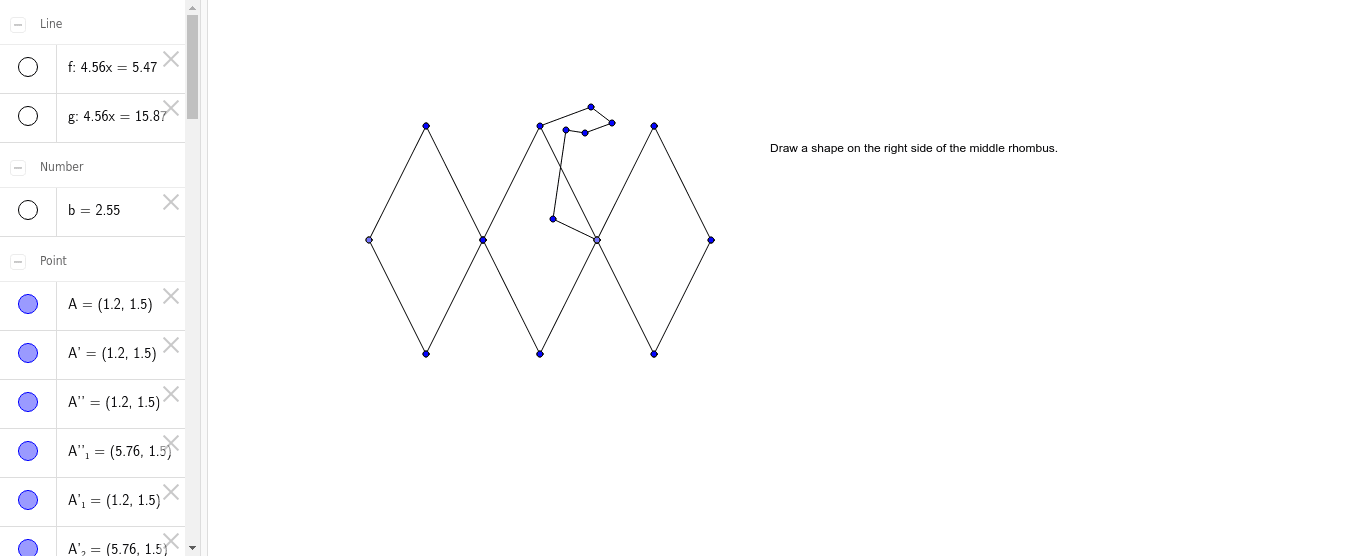
This example demonstrates the process of constructing a tessellation pattern using a rhombus and reflection operations. Key math concepts include reflection transformation, polygon tessellation, and symmetry. The construction involves GeoGebra commands like Segment, Point, Mirror, and Line to build the rhombus and its reflected images. Suitable for high school mathematics education to understand geometric transformations and tessellation patterns.
GeoGebra Commands & Parameters
Segment(A, B) → aPoint(Circle[B, 2.55]) → ESegment(B, E) → dSegment(A, E) → cMirror(A, c) → A'Mirror(B, c) → B'Segment(A', B') → a'Mirror(B, c) → B'_1Mirror(E, c) → E'Segment(B'_1, E') → d'Segment(B, B') → eLine(A, e) → fLine(E, e) → gMirror(A, f) → A'_1Mirror(B, f) → B'_2Segment(A'_1, B'_2) → a'_1Mirror(A', f) → A''Mirror(B', f) → B''Segment(A'', B'') → a''Mirror(B'_1, f) → CMirror(E', f) → E''Segment(C, E'') → d''Mirror(B, f) → B'_3Mirror(E, f) → E'_1Segment(B'_3, E'_1) → d'_1Mirror(B, g) → B'_4Mirror(E, g) → E'_2Segment(B'_4, E'_2) → d'_2Mirror(B'_1, g) → DMirror(E', g) → E''_1Segment(D, E''_1) → d''_1Mirror(A, g) → A'_2Mirror(B, g) → B'_5Segment(A'_2, B'_5) → a'_2Mirror(A', g) → A''_1Mirror(B', g) → B''_1Segment(A''_1, B''_1) → a''_1Segment(B, F) → hSegment(F, G) → iSegment(G, H) → jSegment(H, I) → kSegment(I, J) → lSegment(J, E) → m
AI Drawing Prompt Reference
Draw a rhombus and reflect it over one of its sides to create a mirrored image. Connect the reflected rhombus with the original one to form a new shape. Repeat the reflection process using one side of the new shape as the axis, continuously expanding the pattern. The final image should be a tessellation composed of the rhombus and its mirrored symmetrical combinations, demonstrating geometric transformations and symmetry.
The prompt above was compiled from the original drawing commands and is for reference only.