
Rhombus Reflection Tessellation Step 3
Loading the math board and drawing, please wait…
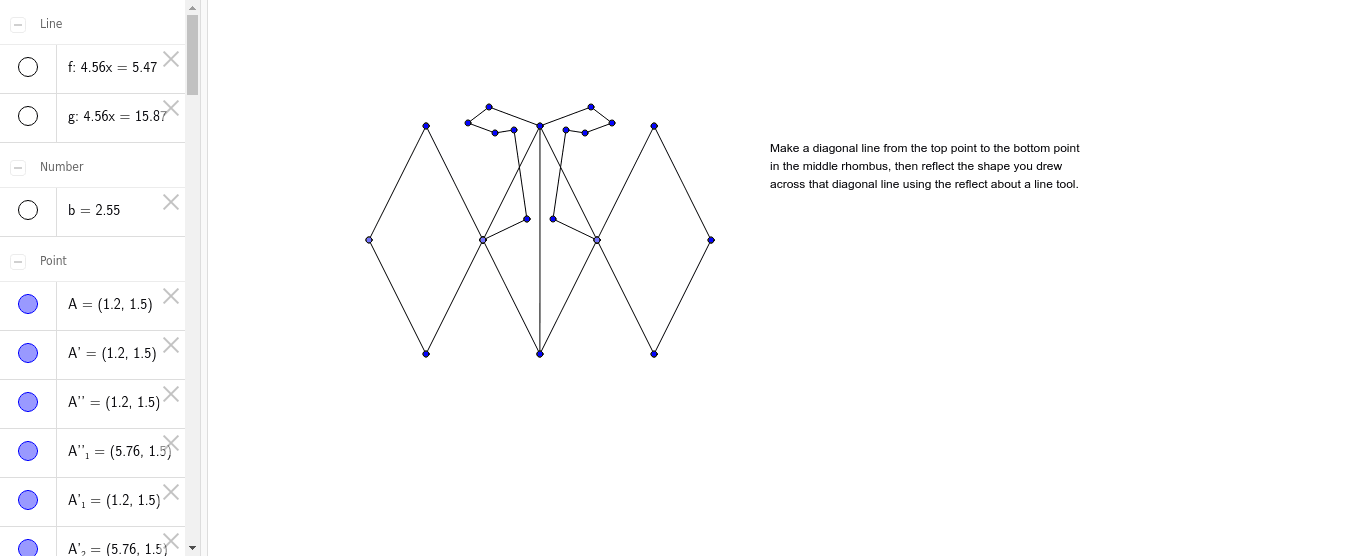
This example demonstrates how to construct a periodic tessellation of rhombi using reflection transformations, illustrating the application of mirror symmetry in plane tiling. Core mathematical concepts include reflection, axial symmetry, properties of rhombi, and tessellation. The construction uses GeoGebra commands such as Segment, Point, Mirror, and Line, as seen in the summary, to repeatedly reflect initial segments and points (A, B, a, b, E, d, c) to generate mirrored copies (A', B', a', etc.), eventually forming a pattern that covers the plane. Suitable for middle school and above to explore geometric transformations and tiling, and useful for teaching pattern design in art.
GeoGebra Commands & Parameters
Segment(A, B) → aPoint(Circle[B, 2.55]) → ESegment(B, E) → dSegment(A, E) → cMirror(A, c) → A'Mirror(B, c) → B'Segment(A', B') → a'Mirror(B, c) → B'_1Mirror(E, c) → E'Segment(B'_1, E') → d'Segment(B, B') → eLine(A, e) → fLine(E, e) → gMirror(A, f) → A'_1Mirror(B, f) → B'_2Segment(A'_1, B'_2) → a'_1Mirror(A', f) → A''Mirror(B', f) → B''Segment(A'', B'') → a''Mirror(B'_1, f) → CMirror(E', f) → E''Segment(C, E'') → d''Mirror(B, f) → B'_3Mirror(E, f) → E'_1Segment(B'_3, E'_1) → d'_1Mirror(B, g) → B'_4Mirror(E, g) → E'_2Segment(B'_4, E'_2) → d'_2Mirror(B'_1, g) → DMirror(E', g) → E''_1Segment(D, E''_1) → d''_1Mirror(A, g) → A'_2Mirror(B, g) → B'_5Segment(A'_2, B'_5) → a'_2Mirror(A', g) → A''_1Mirror(B', g) → B''_1Segment(A''_1, B''_1) → a''_1Segment(B, F) → hSegment(F, G) → iSegment(G, H) → jSegment(H, I) → kSegment(I, J) → lSegment(J, E) → mSegment(B, B') → nMirror(B, n) → B'_6Mirror(F, n) → F'Segment(B'_6, F') → h'Mirror(G, n) → G'Mirror(H, n) → H'Mirror(I, n) → I'Mirror(J, n) → J'Segment(I', J') → l'Mirror(J, n) → J'_1Mirror(E, n) → E'_3Segment(J'_1, E'_3) → m'Segment(F', G') → pSegment(G', H') → qSegment(H', I') → r
AI Drawing Prompt Reference
Start with a rhombus defined by two adjacent vertices and a diagonal. Reflect the entire rhombus across one of its sides to create a mirrored adjacent rhombus. Then reflect across another side to extend the pattern further. Repeat this reflection process in multiple directions, allowing the rhombi to tile the plane periodically. The final image shows a symmetric, continuous tessellation of congruent rhombi sharing edges and vertices, covering the entire plane without gaps.
The prompt above was compiled from the original drawing commands and is for reference only.