
Reflection Station: Basic Reflections
Loading the math board and drawing, please wait…
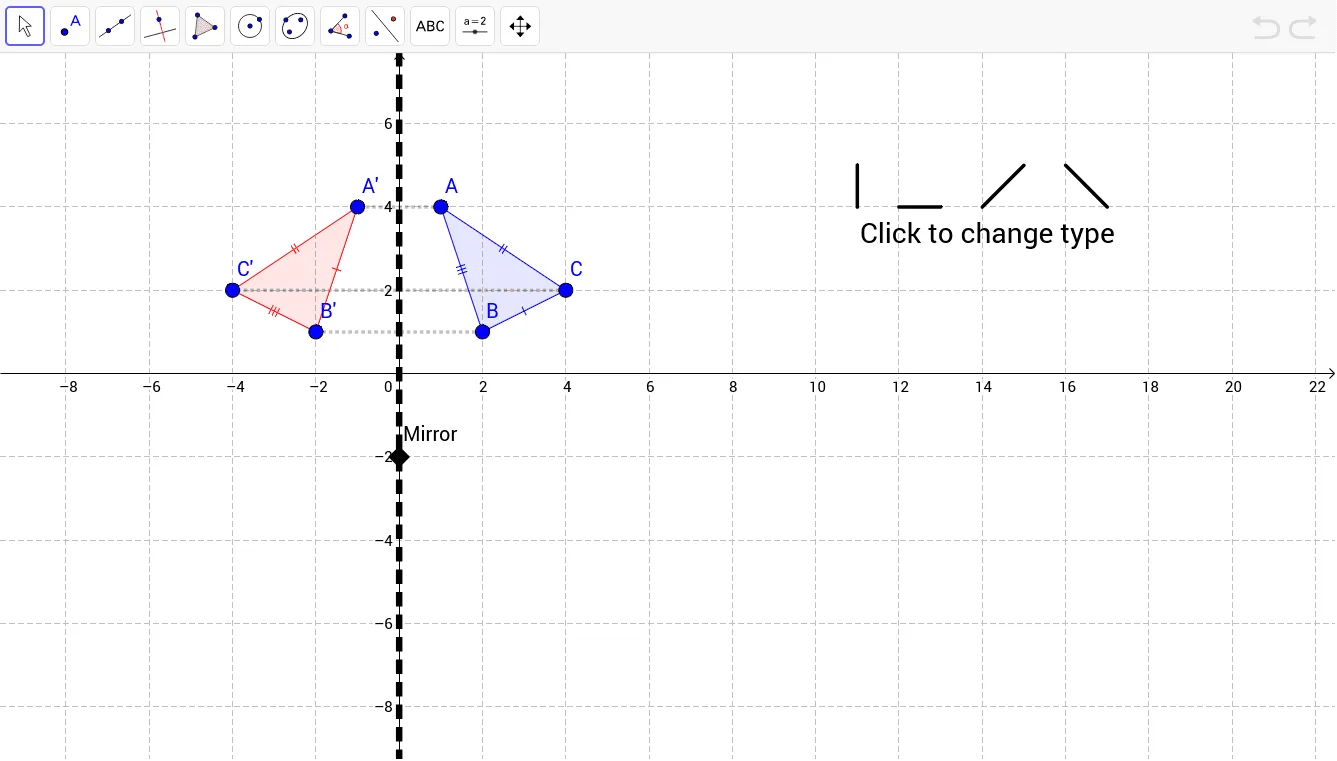
This example demonstrates basic reflections, including vertical, horizontal, and 45-degree diagonal reflections. Students will explore how the shapes change before and after reflection, understanding the core concept of reflection transformations. GeoGebra commands used include Polygon, Segment, Line, Mirror, etc., to construct the reflected shapes. Suitable for middle school and above students to learn geometric transformations.
GeoGebra Commands & Parameters
Polygon(A, B, C) → poly1, c, a, bSegment(D, E) → dSegment(F, G) → eSegment(H, I) → fLine(J, If[vert, x = 0, If[horiz, y = 0, If[diag, y = x, y = -x]]]) → gSegment(K, L) → hMirror(A, g) → A'Mirror(B, g) → B'Mirror(C, g) → C'Polygon(A', B', C') → poly1', c', a', b'Segment(C, C') → iSegment(A, A') → jSegment(B', B) → k
AI Drawing Prompt Reference
Draw a triangle and choose a line of reflection (vertical, horizontal, or at a 45-degree diagonal). Place the triangle on one side of the line, and draw its mirror image on the other side. Connect corresponding vertices of the original and reflected triangles with dashed segments to show the reflection. Also include a few separate line segments as extra reference objects, and make the reflection line clearly visible. The overall composition should illustrate how the shape changes position before and after reflection.
The prompt above was compiled from the original drawing commands and is for reference only.