
Two-way Table Probability Analysis
Loading the math board and drawing, please wait…
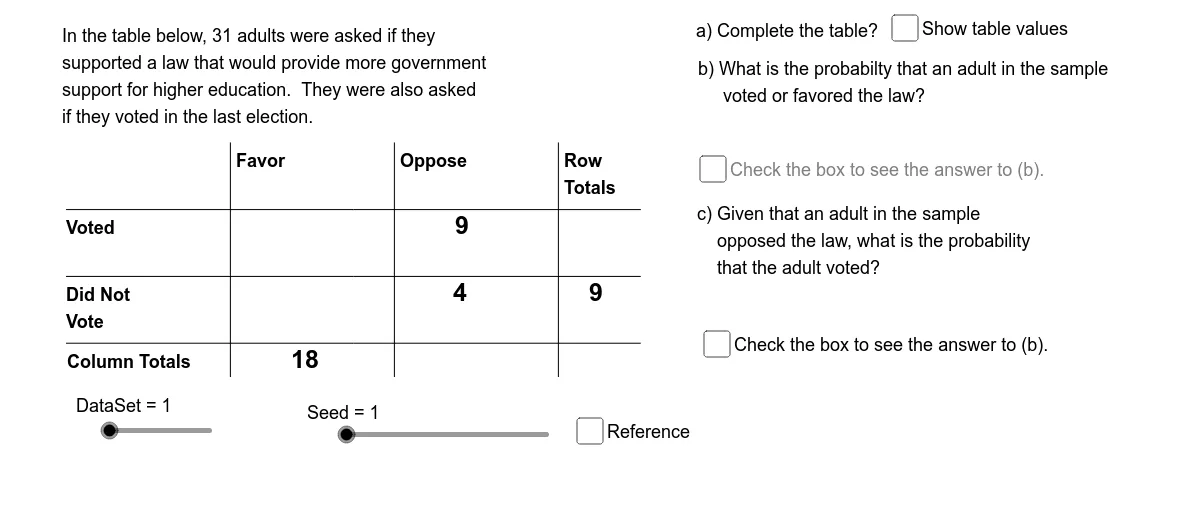
This example demonstrates probability analysis using two-way tables. Key mathematical concepts include conditional probability and probability calculation. The construction summary shows the use of commands like random number generation, conditional judgment, and data set operations. Suitable for high school mathematics education and students learning probability and statistics.
GeoGebra Commands & Parameters
Element(Pr12Sq, DataSet) → Pr12Element(Pr22Sq, DataSet) → Pr22Element(Pr21Sq, DataSet) → Pr21Element(Pr11Sq, DataSet) → Pr11Min({Pr11, Pr12, Pr21, Pr22}) → PrMinMod(SlNm2, 2) → BOpElement(DDSq, DataSet) → DD0Element(RL1Sq, DataSet) → RL1Element(RL2Sq, DataSet) → RL2Element(CL1Sq, DataSet) → CL1Element(CL2Sq, DataSet) → CL2Segment((TbLf, TbTp - TbCH), (TbLf + (3.5 * TbCW), TbTp - TbCH)) → htpSegment((TbLf, TbTp - (2 * TbCH)), (TbLf + (3.5 * TbCW), TbTp - (2 * TbCH))) → hmdSegment((TbLf, TbTp - (3 * TbCH)), (TbLf + (3.5 * TbCW), TbTp - (3 * TbCH))) → hbmSegment((TbCW, TbTp), (TbCW, TbTp - (3.5 * TbCH))) → vlfSegment(((2 * TbCW), TbTp), ((2 * TbCW), TbTp - (3.5 * TbCH))) → vmdSegment(((3 * TbCW), TbTp), ((3 * TbCW), TbTp - (3.5 * TbCH))) → vrgElement(IndSq, DataSet) → IndElement(Rw1OpSq, DataSet) → Op1Element(Rw2OpSq, DataSet) → Op2Element(Cl1OpSq, DataSet) → Op3Element(Cl2OpSq, DataSet) → Op4If(OpBNm1 > 2, OpBNm2, OpBNm2 + 2) → OpBNm3Element(OpSq, OpANm1) → OpA1Element(OpSq, OpANm2 + 2) → OpA2Element(OpSq, OpBNm1) → OpC1Element(OpSq, OpBNm3) → OpC2Element(TbRCSq, OpANm1) → TbRwElement(TbRCSq, OpBNm1) → CndRCElement(CndRC, OpBNm2) → BNumElement(RCTtSq, OpBNm1) → BDnmAppend(TbRw, Element[Element[TbRCSq, OpANm3], OpANm2]) → OpASqElement(OpASq, 1) → ANm1Element(OpASq, 2) → ANm2Element(OpASq, 3) → ANm3If(DataSet ≟ 1, "an", "a") → IARandom(1, 2) → baRandom(1, 2) → bbRandom(1, 2) → bcRandom(1, 2) → bdElement(IndSq_1, DataSet) → Ind_1Element(Rw1OpSq_1, DataSet) → Op1_1Element(Rw2OpSq_1, DataSet) → Op2_1Element(Cl1OpSq_1, DataSet) → Op3_1Element(Cl2OpSq_1, DataSet) → Op4_1Element(OpSq_1, OpANm1_1) → OpA1_1Element(OpSq_1, OpANm2_1 + 2) → OpA2_1If(DataSet ≟ 1, "an", "a") → IA_1
AI Drawing Prompt Reference
Create a two-way table for probability analysis, including four conditional probability calculation areas with randomly generated probability values. Use two sliders to control the conditional probabilities of rows and columns, and demonstrate the probability calculation process through conditional judgments and random number generation.
The prompt above was compiled from the original drawing commands and is for reference only.