
Reflection in Action: Mirror and Translation in 3D
Loading the math board and drawing, please wait…
In collections
Mathematics Form 2
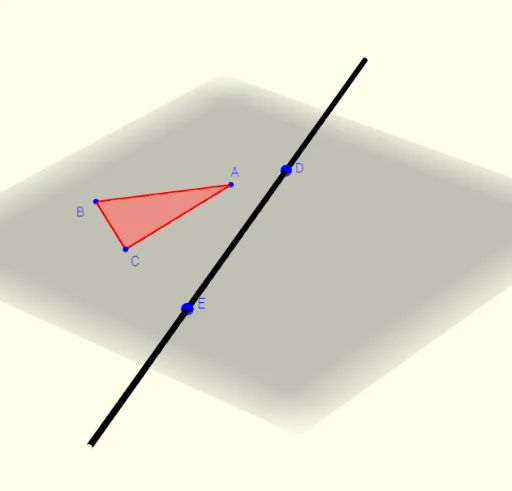
① This GeoGebra example dynamically demonstrates the effect of reflection (mirror) combined with translation and rotation on a 3D solid (such as a rectangular prism), visualizing how geometric transformations act on objects in space. ② Core mathematical concepts include reflection in planes, translation, rotation, orthogonal lines, polygons, and solids or 3D shapes, with a touch of optimization problems as a broader context. ③ Construction highlights: from the summary, commands such as Line, Mirror, Vector, Polygon, Translate, Rotate, OrthogonalLine, Intersect, and Segment are used, creating multiple points (A, B, C, etc.), vectors (u, v, w), lines (d, f), and polygons (poly1, poly2, poly3). Interactive buttons (button1, button2, button3) control the transformation steps, enabling step-by-step exploration. ④ Suitable for high school or early university students learning solid geometry and transformations, as well as for math lab sessions to understand spatial symmetry and rigid motions.
GeoGebra Commands & Parameters
Line(D, E) → fMirror(C, f) → C'Vector(C, C') → vMirror(B, f) → B'Vector(B, B') → wMirror(A, f) → A'Vector(A, A') → uPolygon(A, B, C) → poly1, c, a, bTranslate(A, Vector[(d * u)]) → A'_1Translate(B, Vector[(d * w)]) → B'_1Translate(C, Vector[(d * v)]) → C'_1Polygon(A'_1, C'_1, B'_1) → poly2, b'_1, a'_1, c'_1Rotate(B, (((Dir(2) * d) * 180))°, f) → B'_2Rotate(C, (((Dir(3) * d) * 180))°, f) → C'_2Rotate(A, (((Dir(1) * d) * 180))°, f) → A'_2Polygon(C'_2, A'_2, B'_2) → poly3, b'_2, c'_2, a'_2OrthogonalLine(A, f) → gIntersect(f, g) → FOrthogonalLine(B, f) → hOrthogonalLine(C, f) → iIntersect(f, h) → GIntersect(f, i) → HSegment(A, F) → jSegment(B, G) → kSegment(C, H) → lRotate(A, (((Dir(1) * d) * 180))°, f) → A'_3Rotate(F, (((Dir(1) * d) * 180))°, f) → F'Segment(A'_3, F') → j'Rotate(B, (((Dir(2) * d) * 180))°, f) → B'_3Rotate(G, (((Dir(2) * d) * 180))°, f) → G'Segment(B'_3, G') → k'Rotate(C, (((Dir(3) * d) * 180))°, f) → C'_3Rotate(H, (((Dir(3) * d) * 180))°, f) → H'Segment(C'_3, H') → l'SelectedIndex(Bahasa) → nn
AI Drawing Prompt Reference
Draw a rectangular prism and apply reflection and translation transformations. First, create a rectangular prism. Then, choose a plane as the mirror axis. Next, perform mirror transformations on the prism's three vertices to generate new vertices. Use these new vertices to create a new prism. After that, apply a rotation transformation to the original prism to generate a third prism. Finally, draw some auxiliary lines, such as perpendicular lines and intersections, to help understand spatial symmetry and rigid motions.
The prompt above was compiled from the original drawing commands and is for reference only.