
Reflection about a Line
Loading the math board and drawing, please wait…
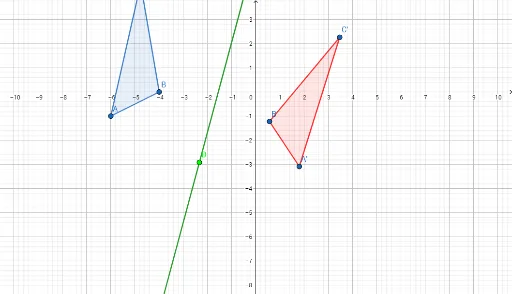
This example demonstrates reflection about a line. Key mathematical concepts include reflection, angles, and geometric transformations. Using GeoGebra commands such as Polygon, Mirror, and LineBisector, the reflection can be constructed. Suitable for students at the junior high school level and above for learning geometric transformations.
GeoGebra Commands & Parameters
Polygon(A, B, C) → t1, c, a, bLine(D, E) → fMirror(A, f) → A'Mirror(B, f) → B'Mirror(C, f) → C'Polygon(A', B', C') → t1', c', a', b'OrthogonalLine(C, f) → gSegment(C, C') → hIntersect(f, h) → FSegment(C, F) → iSegment(C, F) → jSegment(F, C') → kLineBisector(B, B') → lAngle(C, F, D) → αSegment(B, B') → mMidpoint(B, B') → GSegment(B, G) → nSegment(B', G) → pAngle(B, G, F) → βMidpoint(A, A') → HSegment(A, H) → qSegment(H, A') → rAngle(A, H, G) → γ
AI Drawing Prompt Reference
Draw a triangle ABC, then draw a line DE. Reflect A, B, and C across DE to get A', B', and C', and draw triangle A'B'C'. Draw a line perpendicular to DE from C, intersecting DE at F, and draw CF and FC'. Draw the perpendicular bisector of B and B', intersecting DE at G, and draw BG and B'G. Finally, draw the perpendicular bisector of A and A', intersecting BG at H, and draw AH and HA'.
The prompt above was compiled from the original drawing commands and is for reference only.