
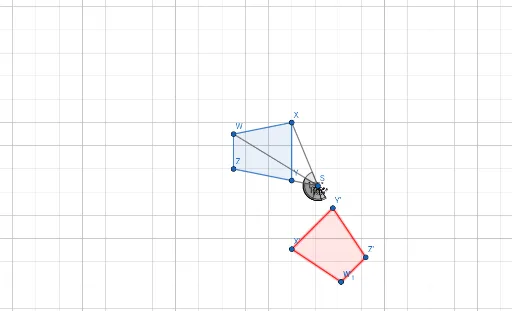
Rotation of Quadrilateral WXYZ 135 CCW about S
Loading the math board and drawing, please wait…
In collections
Rotations Practice 11-8-17
This example demonstrates the geometric transformation of rotating quadrilateral WXYZ 135 degrees counterclockwise about point S. Key math concepts include rotation transformation, angle, polygon construction, and coordinate geometry. It utilizes commands/objects like Polygon, Line, Point, Segment, Rotate, and Angle in GeoGebra. Suitable for high school students learning geometric transformations and coordinate geometry, or for mathematical teaching demonstrations.
GeoGebra Commands & Parameters
Polygon(Z, Y, X, W) → q1, a, b, c, dLine(Z, Y) → fPoint(f) → SSegment(S, Y) → gSegment(S, X) → hSegment(S, W) → iRotate(Y, 135°, S) → Y'Angle(Y, S, Y') → αRotate(W, 135°, S) → W'Angle(W, S, W') → βRotate(W, 135°, S) → W'_1Angle(W, S, W'_1) → γRotate(X, 135°, S) → X'Angle(X, S, X') → δRotate(Z, 135°, S) → Z'Angle(Z, S, Z') → εPolygon(X', Y', Z', W') → q2, x', y', z', w'
AI Drawing Prompt Reference
Draw a quadrilateral WXYZ, then rotate it 135 degrees counterclockwise around point S to get a new quadrilateral W'X'Y'Z'. First, draw the quadrilateral WXYZ, then find its diagonal ZY to determine the rotation center S, draw line segments from S to ZY, rotate points Y, W, X, and Z around S by 135 degrees to get Y', W', X', and Z', and finally connect these points to form the new quadrilateral W'X'Y'Z'.
The prompt above was compiled from the original drawing commands and is for reference only.