
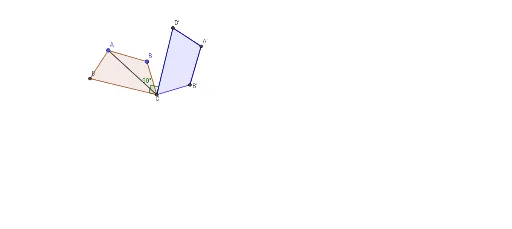
Rotation of Quadrilateral ABCD 90 degrees CW about point C
Loading the math board and drawing, please wait…
In collections
Rotations Practice 11-8-17
This example demonstrates the geometric transformation of rotating quadrilateral ABCD 90 degrees clockwise about point C. Core math concepts include rotation, geometric transformation, coordinate geometry, and angles. Construction highlights involve commands/objects like Point, Polygon, Intersect, Line, Circle, Segment, OrthogonalLine, and Angle from GeoGebra. Suitable for middle school students and above learning geometric transformations and coordinate geometry, or for classroom demonstrations.
GeoGebra Commands & Parameters
Point(Circle[A, 2.936800980659057]) → BPolygon(A, B, C_1, D_1) → q1, a, b, c, dIntersect(c, d) → DIntersect(b, c) → CLine(D, C) → fCircle(C, B) → eCircle(C, A) → gCircle(C, D) → hSegment(C, A) → iOrthogonalLine(C, b) → jOrthogonalLine(C, i) → kIntersect(g, k, 1) → A'Intersect(g, j, 2) → HOrthogonalLine(C, c) → lIntersect(h, l, 1) → D'Segment(C, D') → mSegment(D', A') → nIntersect(e, j) → K, B'Segment(A', B') → pAngle(D', C, D) → αPolygon(D', A', B', C) → q2, j_1, g_1, l_1, f_1
AI Drawing Prompt Reference
Draw a quadrilateral with four vertices connected in order. Choose one vertex as the rotation center, and rotate the entire quadrilateral 90 degrees clockwise around this center to obtain a new quadrilateral. During rotation, draw auxiliary line segments from the rotation center to each original vertex, and mark the correspondence between original and rotated vertices. Also draw perpendicular lines from the rotation center to each side of the original quadrilateral to determine the positions of rotated sides. Finally, distinguish the original and rotated quadrilaterals with dashed lines or different colors, and label the rotation angle as 90 degrees.
The prompt above was compiled from the original drawing commands and is for reference only.