
Reflecting about Y = X and Y = -X
Loading the math board and drawing, please wait…
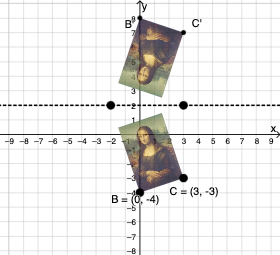
This example demonstrates the geometric reflection of the lines Y = X and Y = -X. Key mathematical concepts include coordinate geometry, reflection transformations, and linear equations. Construction involves GeoGebra commands such as Vector, Translate, Rotate, and Mirror. Suitable for middle or high school mathematics to understand symmetry and coordinate transformations.
GeoGebra Commands & Parameters
Vector(D, E) → uTranslate(pic1, u) → pic1'Translate(B, u) → B'_{4}Translate(C, u) → C'_{4}Vector(B, B'_{4}) → vRotate(C, δ, A) → C'_1CircleArc(A, C'_1, C) → cCircleArc(A, C, C'_1) → dCircle(A, C) → eLine(F, G) → fMirror(pic1, f) → pic1'_2Mirror(B, f) → B'Mirror(C, f) → C'Dilate(pic1, k, A) → pic1'_3Dilate(B, k, A) → B'_3Dilate(C, k, A) → C'_3Rotate(B, δ, A) → B'_1Rotate(pic1, δ, A) → pic1'_1Circle(A, C) → pCircleArc(A, C'_1, C) → rTextfield(δ) → InputBox1Textfield(k) → InputBox2Intersect(q, eq1) → H
AI Drawing Prompt Reference
Draw the coordinate-geometry reflection of the lines Y = X and Y = -X on a plane, emphasizing the symmetry between the original and reflected configurations. Use a set of key points and a translation step to shift the involved elements together, then rotate around a chosen point by an adjustable angle to create the rotated positions. Add circle and circle arcs centered at the same reference point to visualize the arcs determined by the rotation. Next, choose a line as the mirror axis and reflect the translated/constructed figure across it to obtain the corresponding reflected points and lines. Finally, apply a dilation about the same reference point and an additional rotation to complete the symmetrical diagram.
The prompt above was compiled from the original drawing commands and is for reference only.