
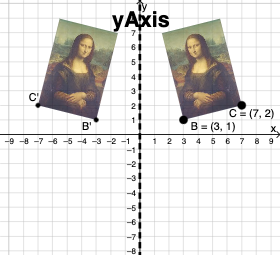
Reflecting about the yAxis
Loading the math board and drawing, please wait…
In collections
Exploring Line Reflections in the Coordinate Plane
This example demonstrates line reflections in the coordinate plane. It involves core math concepts like coordinates, geometry, straight lines, reflection, trigonometric functions, sequences and series, Pythagorean theorem, quadratic equations, and matrices. The construction uses commands such as Vector, Translate, Rotate, CircleArc, Circle, Line, Mirror, Dilate, Textfield, and Intersect. It is suitable for high school students learning coordinate geometry and transformations using matrices.
GeoGebra Commands & Parameters
Vector(D, E) → uTranslate(pic1, u) → pic1'Translate(B, u) → B'_{4}Translate(C, u) → C'_{4}Vector(B, B'_{4}) → vRotate(C, δ, A) → C'_1CircleArc(A, C'_1, C) → cCircleArc(A, C, C'_1) → dCircle(A, C) → eLine(F, G) → fMirror(pic1, f) → pic1'_2Mirror(B, f) → B'Mirror(C, f) → C'Dilate(pic1, k, A) → pic1'_3Dilate(B, k, A) → B'_3Dilate(C, k, A) → C'_3Rotate(B, δ, A) → B'_1Rotate(pic1, δ, A) → pic1'_1Circle(A, C) → pCircleArc(A, C'_1, C) → rTextfield(δ) → InputBox1Textfield(k) → InputBox2Intersect(q, eq1) → H
AI Drawing Prompt Reference
Draw a reflection of a figure about the y-axis in the coordinate plane. Start by creating points D and E, and generating vector u. Then, translate figure pic1, point B, and point C along vector u. Next, create vector v, rotate point C to generate C'_1, and draw arcs c and d. After that, draw line f, and reflect figure pic1, point B, and point C across line f. Then, use scaling factor k to dilate figure pic1, point B, and point C around point A. Finally, rotate point B and figure pic1, draw circle p and arc r, and add input boxes for entering rotation angle δ and scaling factor k.
The prompt above was compiled from the original drawing commands and is for reference only.