
Reflecting a Pentagon Over the Axes
Loading the math board and drawing, please wait…
In collections
Transformations
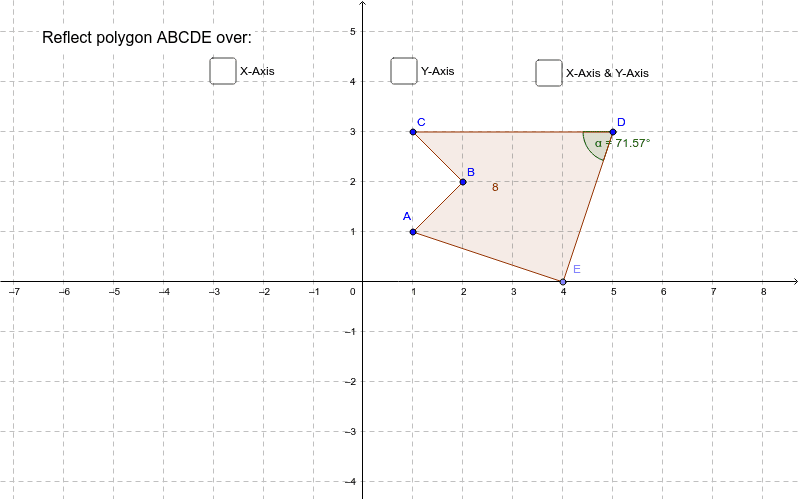
This example demonstrates how an irregular pentagon is reflected over the axes. Key mathematical concepts include geometric transformations, specifically axis reflection. Using GeoGebra commands such as Point, Polygon, Mirror, and Angle, the reflected pentagon is constructed. Suitable for middle school and above students learning geometric transformations.
GeoGebra Commands & Parameters
Point(xAxis) → EPolygon(A, B, C, D, E) → poly1, a, b, c, d, eMirror(A, yAxis) → A'Mirror(B, yAxis) → B'Mirror(C, yAxis) → C'Mirror(D, yAxis) → D'Mirror(E, yAxis) → E'Polygon(A', B', C', D', E') → poly1', a', b', c', d', e'Mirror(A, xAxis) → A'_1Mirror(B, xAxis) → B'_1Mirror(C, xAxis) → C'_1Mirror(D, xAxis) → D'_1Mirror(E, xAxis) → E'_1Polygon(A'_1, B'_1, C'_1, D'_1, E'_1) → poly1'_1, a'_1, b'_1, c'_1, d'_1, e'_1Mirror(A', xAxis) → A''Mirror(B', xAxis) → B''Mirror(C', xAxis) → C''Mirror(D', xAxis) → D''Mirror(E', xAxis) → E''Polygon(A'', B'', C'', D'', E'') → poly1'', a'', b'', c'', d'', e''Angle(C, D, E) → αAngle(E', D', C') → βAngle(C'', D'', E') → γAngle(E, D'_1, C'_1) → δ
AI Drawing Prompt Reference
Draw an irregular pentagon ABCDE, then reflect it twice, once over the y-axis and once over the x-axis, to get pentagon A''B''C''D''E''. First, take point E on the x-axis and connect points A, B, C, D, and E to form pentagon poly1. Then, reflect pentagon poly1 over the y-axis to get pentagon A'B'C'D'E', and reflect A', B', C', D', and E' over the x-axis to get pentagon A''B''C''D''E''. Finally, measure the angles CDE, E'D'C', C''D''E', and E'D''C'_1.
The prompt above was compiled from the original drawing commands and is for reference only.