
Reference Angles and the Unit Circle
Loading the math board and drawing, please wait…
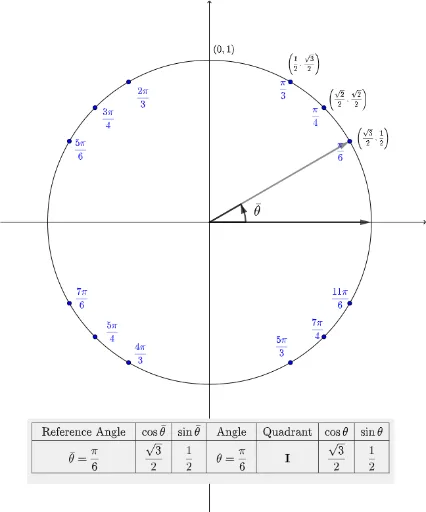
This example demonstrates how to understand trigonometric values of any angle using reference angles on the unit circle. Key concepts include reference angles, unit circle, trigonometric functions (sine, cosine), and quadrants. Construction highlights involve GeoGebra commands like Intersect, Rotate, Angle, and objects such as Origin, unitCircle, and thetaText for precise drawing and calculation. Suitable for high school students learning the relationship between trigonometry and the unit circle, or for initial exploration of vector projections in solid geometry.
GeoGebra Commands & Parameters
Intersect(xAxis, yAxis) → OriginRotate(Pi0, 1.5707963267948966) → Pi1Over2Rotate(Pi0, 1.0472) → Pi1Over3Rotate(Pi0, 0.7854) → Pi1Over4Rotate(Pi0, 0.5236) → Pi1Over6Rotate(Pi0, 2.0943951023931953) → Pi2Over3Rotate(Pi0, 2.356194490192345) → Pi3Over4Rotate(Pi0, 2.617993877991494) → Pi5Over6Rotate(Pi0, 3.141592653589793) → Pi1Over1Rotate(Pi0, 3.665191429188092) → Pi7Over6Rotate(Pi0, 3.9269908169872414) → Pi5Over4Rotate(Pi0, 4.1887902047863905) → Pi4Over3Rotate(Pi0, 4.71238898038469) → Pi3Over2Rotate(Pi0, 5.235987755982988) → Pi5Over3Rotate(Pi0, 5.497787143782138) → Pi7Over4Rotate(Pi0, 5.759586531581287) → Pi11Over6Angle(refpt, selpt) → thetabar